Wysera Review: One AI That Posts, Answers, and Follows Up
Updated on August 9, 2026
Wysera bundles social posting, a CRM, and client follow-up behind a single AI that drafts and waits for your approval. Here is what it does well, what it hides, and who should skip it.
Verdict
A genuinely good idea about AI autonomy, wrapped in a product that is still in beta and will not tell you what it costs.
- Best for
- Solo operators and two-person teams who currently run a social scheduler, a CRM, and a follow-up sequence in three separate tools and want one login.
- Skip it if
- You already have a working stack, you need deep reporting, or you cannot start a purchase with a sales conversation.
- Price
- Free during beta. Paid tiers say 'Let's talk'.
What works
- Approval-first design: the AI drafts, you ship, with an audit trail and one-click rollback
- Real breadth for one login: content calendar, 11 CRM modules, booking links, brand voice
- Onboarding takes a LinkedIn URL and a paste of your bio, not a data migration
- Honest enough to publish a comparison page listing where HubSpot beats it
What does not
- No published price anywhere. Three of their own pages give three different numbers
- The free tier has no AI in it, which makes it a demo rather than a plan
- Five product lines and 40+ modules while still calling itself a beta with 24+ teams
- Their own homepage claims 120+ reviews and then links to 7 of them
- 10 native integrations. Everything else goes through Zapier
This is the first review on Nick Launches, so a note on method before anything else. I did not create an account. Everything below comes from Wysera's own site (homepage, pricing, integrations, and their HubSpot comparison page), their press kit screenshots, and public listings. Where I am reporting a claim rather than something I verified, I say so. When I do get hands on a paid workspace, I will update this page and date the change.
With that out of the way: Wysera is trying to be the one tool a small business opens in the morning. Social posting, inbound lead replies, and client follow-up, all run by a single AI that drafts work and then waits for you to say yes.
What Wysera actually is
It is five products under one login, orchestrated by an agent called Wyse.
- Wyse is the brain. It plans work and hands it to whichever product should do it.
- PostWyse handles marketing: content generation, a calendar, SEO tooling, publishing to six social platforms.
- OpsWyse is the CRM and operations side: people, companies, leads, deals, plus a long tail of modules the company puts at "40+".
- BrandWyse holds your brand voice and identity so both other products write in the same tone.
- HireWyse is not software at all. It is a done-for-you service where they drop a marketing pod into your team.
The pitch is consolidation. Their own pricing page runs a table of tools it claims to replace, with real prices attached: Semrush Guru at $250 a month, Ahrefs Standard at $199, Hootsuite Business at $249, Jasper Business at $125, HubSpot at $800, Zendesk Suite Team at $207, Zapier Professional at $74, plus Slack, Jira, Confluence, Calendly and Linktree. They total it at "$1,872+/mo" and position themselves against that number.
Hold that thought. We will come back to it.
The approval model is the real product
Most AI tools in this category sell autonomy. Wysera sells the opposite, and it is the most interesting thing about it.
Their words: "Approval is the default. Wyse drafts, you approve. Autonomy is opt-in per category, with a full audit trail and one-click rollback."
That is the right default for the businesses they are chasing. If you run a med spa, a post that goes out unreviewed is not a growth experiment, it is a compliance problem. Same for a CPA firm in April, or an insurance agent whose every client message sits near a regulated claim. An AI that drafts a follow-up and parks it in an approval queue is a tool you can actually let near a client list.
You can see it in the dashboard. The morning brief counts approvals pending alongside unread threads, so the queue is a first-class object rather than a settings toggle buried three menus deep.
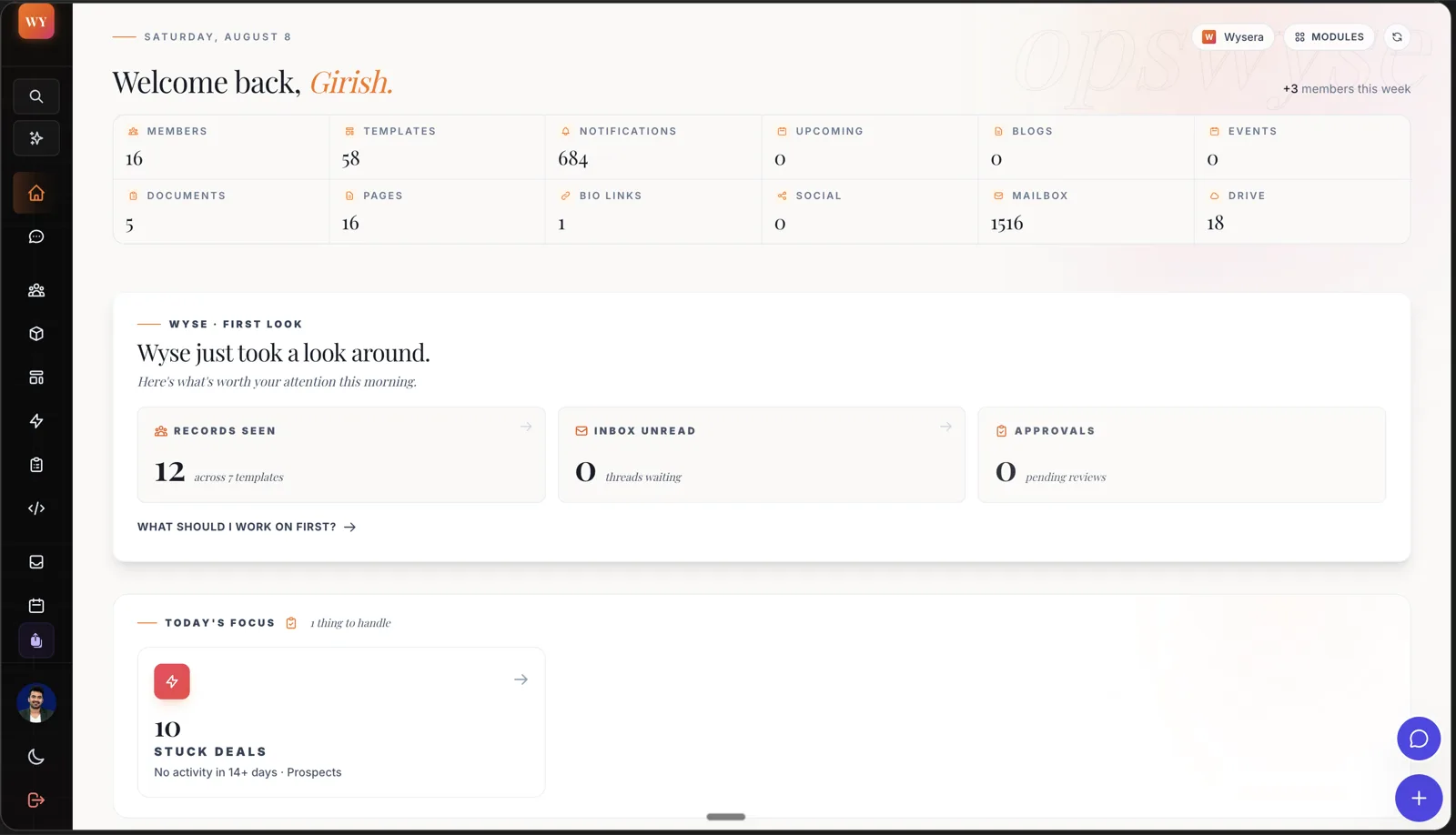
Note the panel at the bottom: ten stuck deals with no activity in fourteen days. That is the kind of thing a solo operator never notices until the quarter is over, and surfacing it on the home screen is a better use of AI than writing another LinkedIn post.
What you get
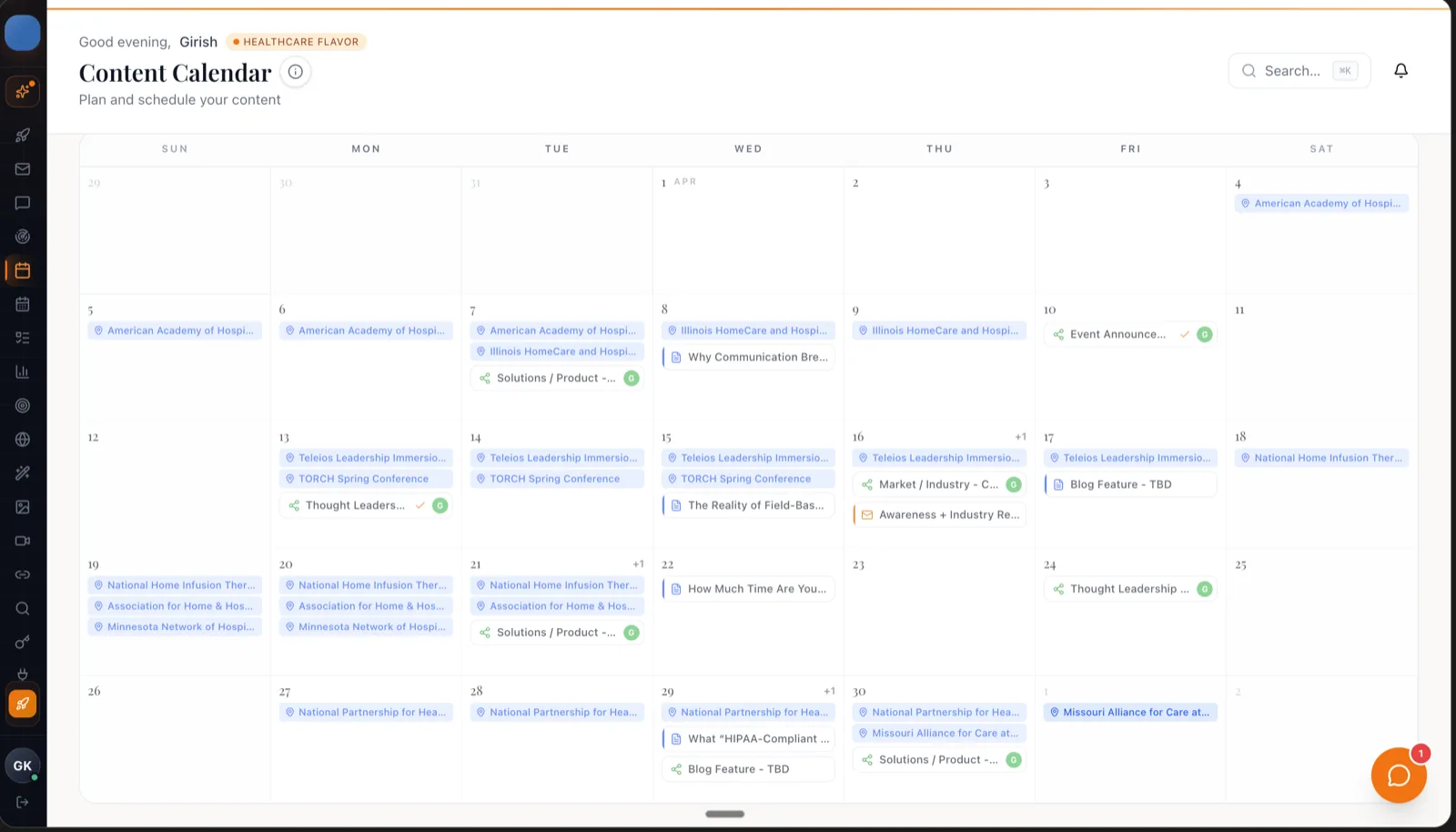
Content and social. A calendar view, drafts, and scheduling across six platforms on the paid tiers. The screenshot below is their healthcare-flavored demo workspace, which tells you something about who they think their buyer is.
CRM and pipeline. Four core modules on Starter (People, Companies, Leads, Deals), ten on Growth, all eleven on Pro along with what they call a fourteen-step revenue chain, plus Contract Radar, Churn Risk and Customer Health scoring at the top tier.
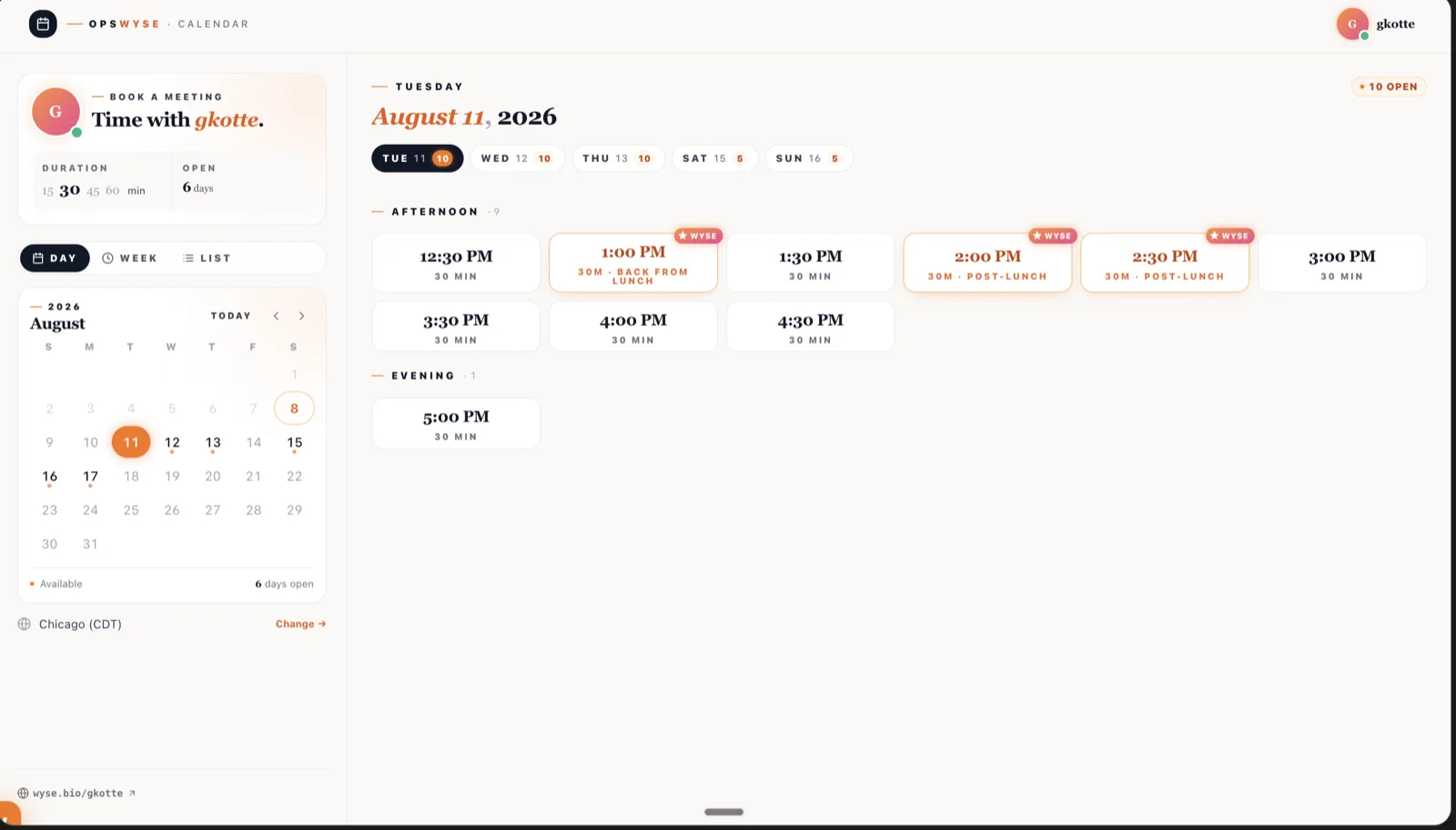
Booking. Scheduling links with AI-suggested slots. The suggestions are labelled in the UI, which is a small honest touch: you can see which times Wyse picked and why.
Workflows. This one is worth looking at closely, because it is their own marketing screenshot and it undercuts the pitch slightly.
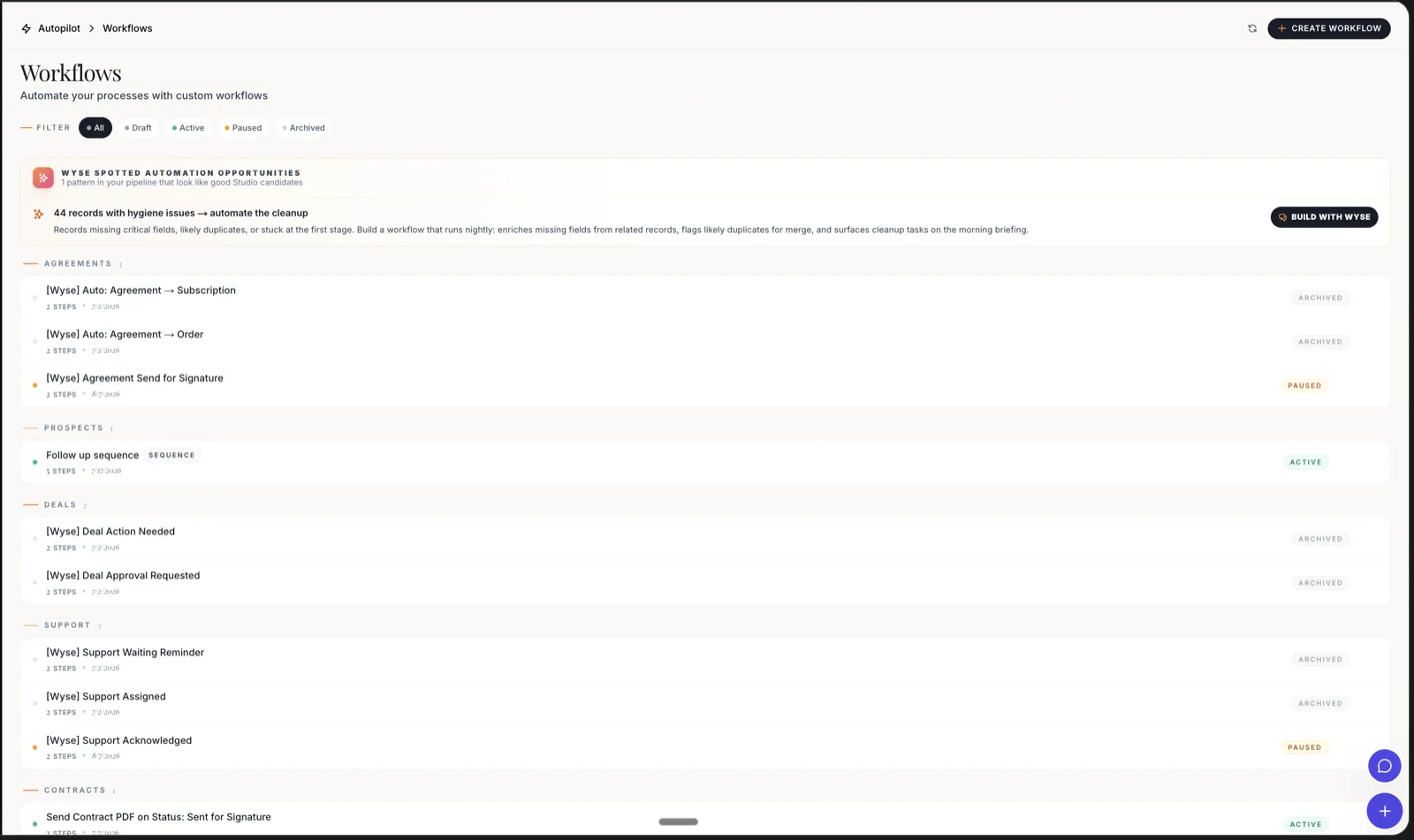
Wyse has generated a stack of workflows: agreement to subscription, deal action needed, support acknowledged, contract sent for signature. In the shipped screenshot, almost all of them are archived or paused. Exactly one, a follow-up sequence, is active. I would not read too much into a demo account, but "the AI generates lots of automations and you end up running one" is a failure mode worth watching for.
What the first hour looks like
Onboarding is the strongest part of the public product. BrandWyse asks for your name, then a LinkedIn URL, a site, an X profile, or a pasted bio. From that it drafts your brand DNA and a ninety-day plan, and walks you through four steps: sources, generate, review, live.
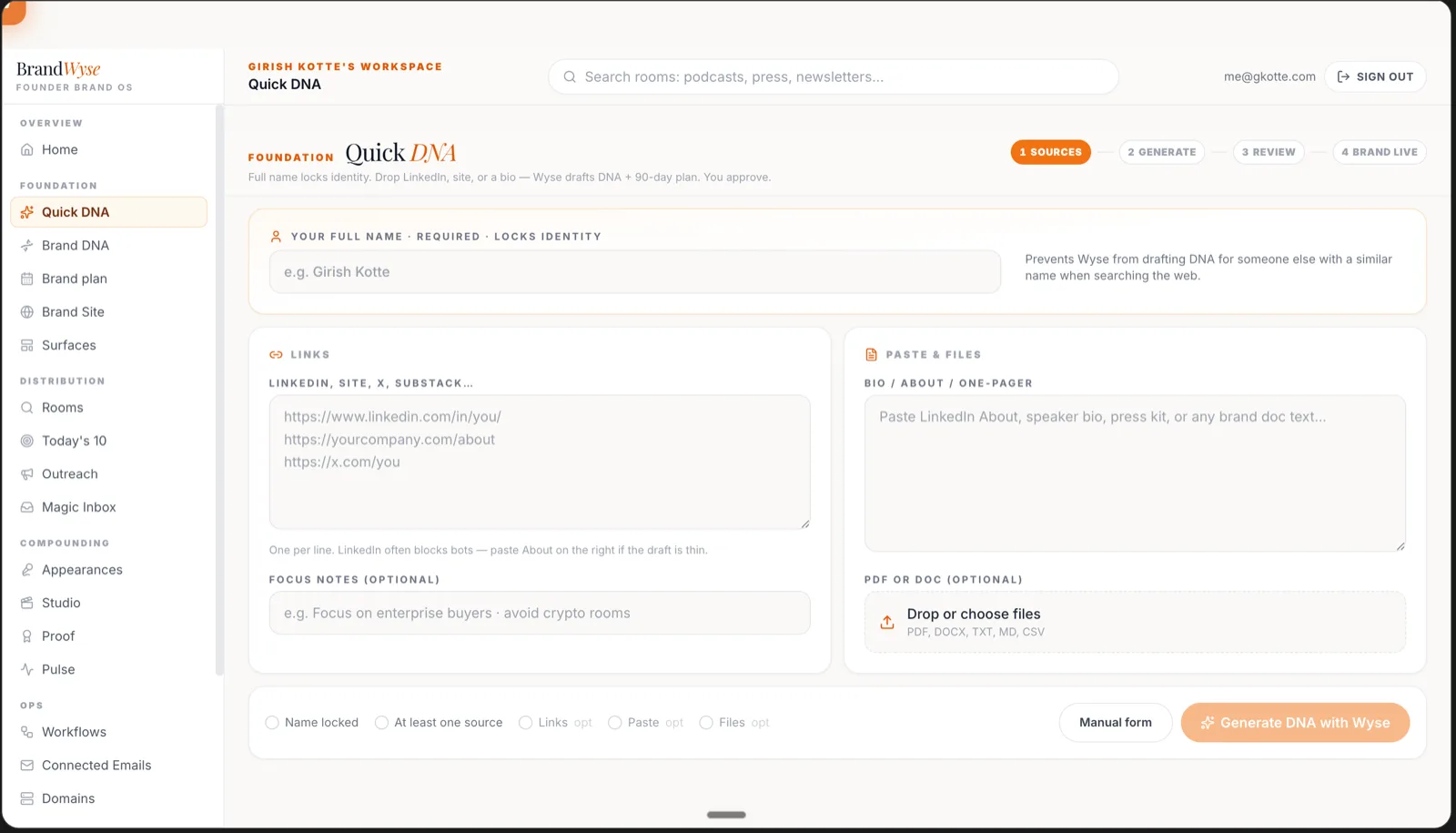
No CSV import, no field mapping, no implementation call. For a solo operator, that difference is the entire buying decision. Getting to a first draft in ten minutes beats a more powerful tool that needs a weekend.
Pricing, and why I cannot tell you what it costs
Here is where the review gets uncomfortable.
Wysera publishes a pricing page. Every tier on it, Starter through Enterprise, says "Let's talk. Your budget, our price. Your success, our priority." Not one number.
The same company that lists Semrush at $250 and Zendesk at $207 to the dollar will not tell you what its own Growth Bundle costs.
It gets messier. Across three of their own pages I found three different answers:
| Page | What it says |
|---|---|
| Pricing page | "Let's talk" on all four paid tiers |
| Homepage | "$0 free during beta", then bundles at "$69, $149, and a flat top tier" |
| HubSpot comparison | "Starting price (marketing) $29/mo" |
Annual billing is said to save another 20%. There is a free tier, and it is thin: one workspace, one seat, fifty records, five manual posts a month to LinkedIn and X, and explicitly no Wyse AI, no SEO suite, and no analytics. A free plan of an AI product with the AI removed is a demo, not a plan. Seat counts on paid tiers go one, three, ten, unlimited.
To be fair, they say the beta is free with no card and no sales call, and that plain numbers are coming. Fine. But "your budget, our price" is a sentence that means you will be quoted based on what they think you can pay, and you should walk into that conversation knowing it.
Integrations
Ten native connections, with claimed setup times: Gmail and Google Calendar at ten minutes, Slack and Linear at fifteen, Notion and Calendly at twenty, Stripe and Shopify at thirty, HubSpot at forty-five. Then Zapier, which is the escape hatch to roughly 7,000 apps.
Ten is not many. Their comparison page puts HubSpot at 1,500+ and does not pretend otherwise, which I respect more than I expected to. If your business runs on something outside that list, you are living in Zapier, and a consolidation tool that needs an automation tool to reach your other tools is a slightly different product than the one advertised.
Who this is actually for
The company positions this at teams of five to two hundred and fifty. I think that is too broad, and the narrower version is more convincing.
It fits the operator who is currently paying for a social scheduler, a CRM, and an email sequencing tool, uses maybe fifteen percent of each, and loses an hour a week moving text between them. Solo med spas, small accounting practices, single-agent insurance shops. Businesses where the follow-up is the revenue, nobody has a marketing hire, and one wrong automated message is a real problem.
For that person, an AI assistant for client follow-up that drafts the message and holds it for review is worth more than a better CRM would be.
It does not fit anyone with a working stack. If your Hootsuite and your HubSpot are both earning their keep, this is a lateral move with a migration attached.
Where it falls short
No public price. Covered above. It is the single biggest reason to hesitate.
Beta breadth. Five product lines and forty-plus modules, with "24+ teams shipping with Wyse" on the homepage. That is a lot of surface area for that much usage. Broad and new usually means shallow in the places you personally care about, and you will not find out which places until you are in.
The social proof does not add up. The homepage carries "4.9 · 120+ reviews" and, a few lines down in the same section, a link reading "Read all 7 reviews on Trustpilot". Both statements are on one page. Trustpilot blocks automated requests so I could not check the live count myself, and I am not going to guess which number is right. But a company asking me to trust it with a client database should get its own review count consistent.
Roadmap items presented as near-term. White-label, per-client AI, and enterprise scale are all listed as roadmap. Price accordingly.
Depth versus specialists. The SEO suite is not Ahrefs. The support module is not Zendesk. Consolidation math only works if the replacement is good enough at each job, and that is the thing you cannot evaluate from the outside.
Alternatives worth a look
- HubSpot. More mature, far more integrations, proven at scale, and expensive. Marketing Hub Professional starts around $800 a month before you add Sales Hub seats. Right answer if you have the budget and the team to run it.
- Assemble it yourself. Notion or Airtable for records, Buffer or Later for social, Calendly for booking, Zapier to connect them. Cheaper, more control, and you own the seams. Costs you the hour a week Wysera is selling back.
- A specialist CRM for your industry. Med spas, accounting, and insurance all have vertical CRMs that already know your compliance rules. Narrower, and usually better at the one thing.
FAQ
Is Wysera free? There is a free tier forever: one workspace, one seat, fifty records, five manual posts a month to LinkedIn and X. It excludes the AI, the SEO suite, and analytics. The beta is also currently free with no card required.
What does Wysera cost? They do not publish it. The pricing page says "Let's talk" on every tier. The homepage mentions $69 and $149 bundles, and the HubSpot comparison page mentions $29 a month as a marketing starting price. Assume a sales conversation.
Does the AI post without me? Not by default. Approval is the default state, autonomy is opt-in per category, and there is an audit trail with one-click rollback.
Does it integrate with my tools? Ten native integrations: Slack, HubSpot, Stripe, Notion, Linear, Gmail, Google Calendar, Calendly, Shopify, and Zapier. Anything else goes through Zapier.
Who is behind it? Wysera HQ Ltd, registered in Dover, Delaware. The company says it was built by an operator with twelve years in small business software.
Should you use it?
If you are a solo operator drowning in three subscriptions you half-use, sign up for the free beta and spend an afternoon with it. The approval queue and the ten-minute onboarding are real, and the cost of trying is currently zero.
If you are past that stage, the case is still decent, just slower. The approval model, the onboarding, and the breadth are all further along than the beta label suggests, and for the operator this is aimed at, the consolidation math works. That is what the 4 out of 5 is for. The missing point is entirely the pricing page: publish real numbers, get the review count straight, and this becomes an easy recommendation instead of a qualified one.
Building something? Submit it on Nick Launches. Listing is free and the do-follow backlink is permanent. If you are working out where else to get listed, start with the launch directories list and the basic SEO guide.