QR Menu Generator Review: A Good Menu Builder That Fixed Its EU Allergen Problem
Updated on September 1, 2026
QR Menu Generator builds a clean digital menu in minutes and updates it instantly. Its headline claim, EU Regulation 1169/2011 allergen coverage, failed the first test. A re-test a week later found the fourteen labels, the audit trail and the guest filter in place.
Verdict
A fast, good-looking digital menu builder whose EU allergen tooling now matches the claim, a week after it did not. Rating moved from 3.8 to 4.5 on the re-test, as promised.
- Best for
- Small independent restaurants and cafes that want a clean, instantly editable QR menu with the fourteen EU allergen labels, a change log they can show an inspector, and a guest filter that hides dishes by allergen.
- Skip it if
- You need online ordering or a POS, or you want software that refuses to save a dish until an allergen label is set. It still lets you save an unlabelled dish without a warning.
- Price
- Free tier, capped at 20 items. Pro $9.90/mo, Pro Plus $17.99/mo, with two months free on yearly billing.
What works
- From login to a live, styled menu on a real phone in well under an hour, with no import and no setup call
- All fourteen Annex II allergens are separate labels, with peanuts split from tree nuts and crustaceans from molluscs
- Change history logs who changed what and when, with old and new values, filterable to allergen edits, exportable as CSV
- Guests can hide every dish containing a chosen allergen from the public menu, and the choice sticks across categories
- Edits are genuinely instant: price and currency changes hit the public menu immediately, same QR code
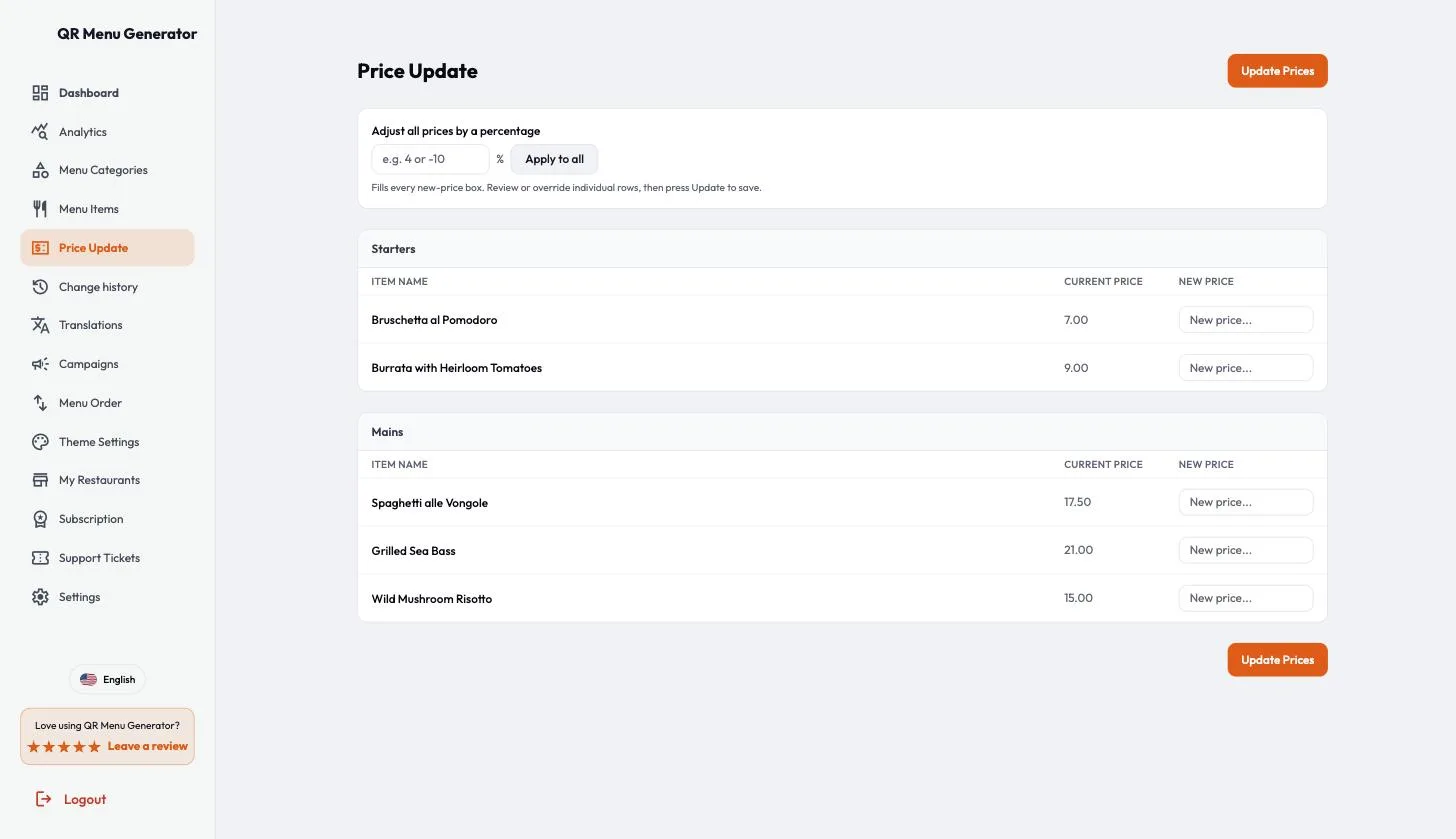
- Bulk price update takes a percentage and fills every row for review before anything is saved
What does not
- The compliance page still says the system validates coverage and flags missing information. It does not: a dish saves with no allergen label and no warning
- Change history records edits and deletions but not the creation of a dish, so an unlabelled dish added by staff leaves no entry
- The print PDF is an A4 page with the QR rasterised as a 200 dpi JPEG. Use the SVG for anything you print
- /demo is still a signup form, not a demo
What changed since the first version. This review was first published on 25 August 2026 with a 3.8 rating and a finding that the EU allergen claims were unsupported; the vendor shipped fixes between 26 and 31 August and asked for a re-check. On 1 September 2026 I re-tested the eight points below on the same Pro Plus account, the allergen work now holds, and the rating is 4.5.
Disclosure first. This is a sponsored placement: QR Menu Generator paid to be reviewed on Nick Launches. What they did not buy is the verdict. They gave me a live Pro Plus account, I spent an afternoon in it building a real menu, and nothing below was shown to them before publishing. The critical section is the longest one, and it stays the longest one in this revision.
So this review is the opposite of the Wysera one, which I wrote from the outside with no account. Here I had the top tier, and I checked the marketing claims against the actual dashboard one at a time. Some held. The biggest one did not, at first.
QR Menu Generator wants to be the thing a small restaurant uses instead of reprinting menus. Everything I describe was tested on 25 August 2026 and re-tested on 1 September 2026. Where the two dates disagree, I say so.
What it actually is
A hosted digital menu with a QR code pointing at it. You create a restaurant, add categories and dishes, pick a theme, and the platform gives you a permanent public URL plus a QR image to stick on tables. Change a price, the same QR now shows the new price.
The dashboard is fourteen items in a sidebar: Dashboard, Analytics, Menu Categories, Menu Items, Price Update, Change history, Translations, Campaigns, Menu Order, Theme Settings, My Restaurants, Subscription, Support Tickets, Settings. That is the whole product. There is no ordering, no payments, no POS, no kitchen display. It shows a menu, and it is upfront about that in the product even when the marketing is not.
The pitch on top of it is European regulation. The homepage badge says "EU REGULATION 1169/2011 COMPLIANT", there is a dedicated /eu-allergen-compliance landing page, and the competitor comparison page leads with allergen compliance as the row where it beats everyone. Hold that thought.
The first hour
I logged into a Pro Plus account with nothing in it. The empty dashboard already had a restaurant and a working QR code, which is a nice touch: the thing you are being sold exists before you have done any work.
"Create New Menu" takes you to Menu Categories. I made two, Starters and Mains, in about twenty seconds each. The category modal has a parent field, so you can nest subcategories, and a visibility toggle that hides a category from the public menu without deleting it. Both are the right features.
Then Menu Items. Five dishes, each with a name, a description, an optional calorie count, a price, an optional photo, and the allergen and diet labels. The form is one modal and it does one genuinely thoughtful thing: after you save, it clears the fields but keeps the category selected, so you can type five dishes in a row without reopening anything. Two categories and five dishes took me a few minutes. A restaurant owner typing their own copy and uploading photos would spend an afternoon, not a weekend, and there is no field mapping and no onboarding call. There is now an "Import with AI" button for a photo or PDF of an existing menu, which arrived after my first test and which I have not tried.
Theme Settings is the strongest screen in the product. Eight themes, and the live preview is a phone frame rendering your real menu, not a stock mockup.
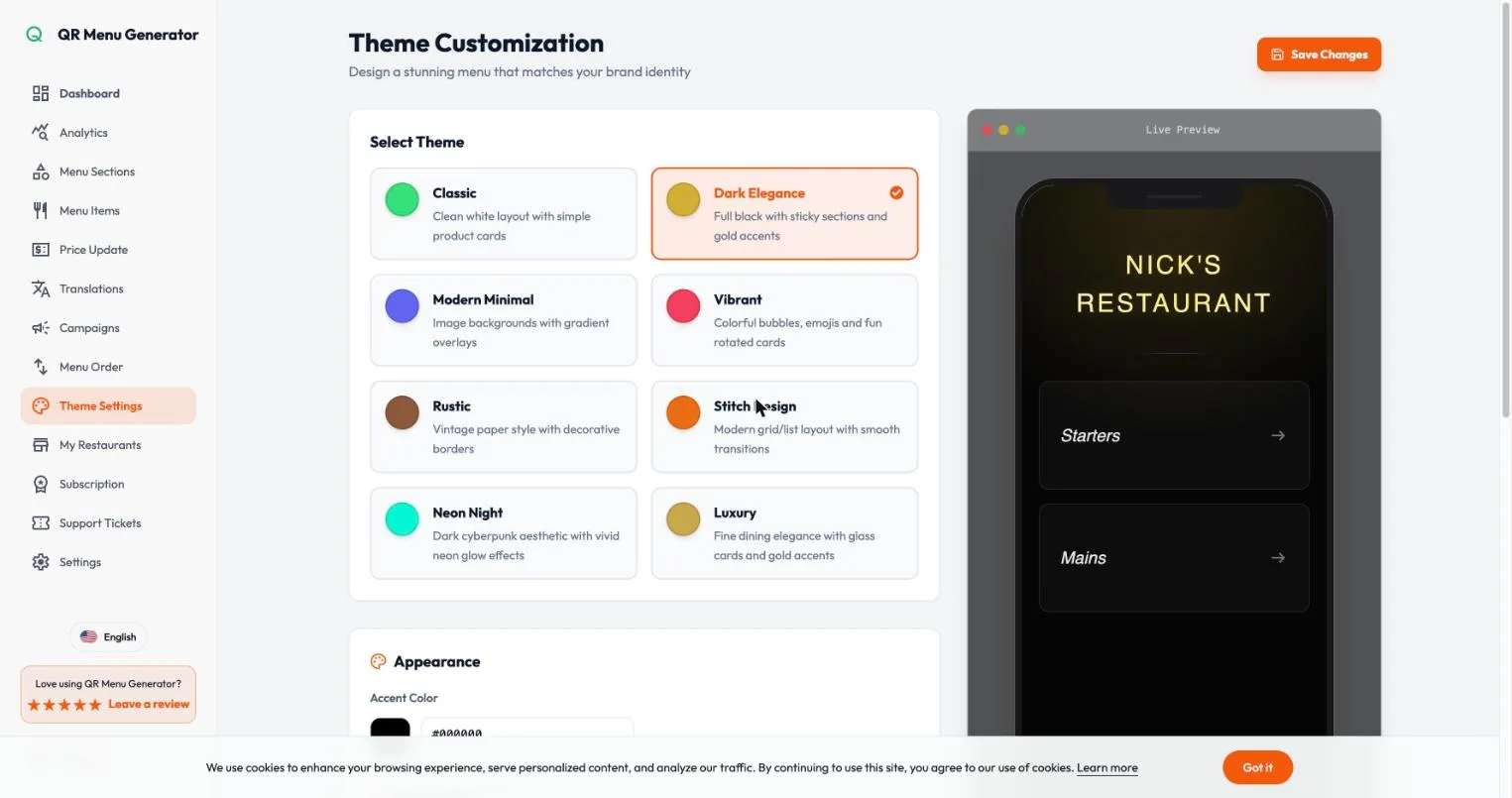
Themes are the sort of thing that is usually four variations on white. These are actually different: Dark Elegance and Luxury look like a wine list, Vibrant looks like a bubble tea shop. For a category where the alternative is a PDF, that matters.
Then I set the restaurant currency to EUR, and on 25 August this is where I hit the first real bug. The Save button sat at the very bottom of the restaurant settings form, and the cookie consent bar was fixed to the bottom of the viewport, directly on top of it. Fully scrolled, the button was completely covered. I clicked it, nothing happened, no error, and the currency silently reverted to USD. Dismissing the banner brought the button back and the save worked immediately.
Re-tested on 1 September with the consent banner deliberately brought back: the form now ends with enough padding that the Save button sits clear above the bar, and a currency change to GBP saved first time, with a "Restaurant updated" toast, without dismissing anything. Fixed.
The allergen re-test
This is the section that decided the first rating, and it decides this one, so I want to be precise about what was broken, what the vendor says he changed, and what I actually verified.
What was broken on 25 August. The /eu-allergen-compliance page correctly lists the fourteen allergens from Annex II of Regulation (EU) No 1169/2011, then says the product has a "built-in allergen tagging system covers all 14 regulated allergens from Annex II". The item form at the time offered eleven "contains" labels: Gluten, Dairy, Nuts, Egg, Soy, Wheat, Celery, Mustard, Sesame, Sulfites, Shellfish. Fish, peanuts, lupin and molluscs had no label at all. Peanuts and tree nuts were one "Nuts" label, crustaceans and molluscs were one "Shellfish" label, and wheat was offered as its own allergen, which is not how Annex II works. The same page promised timestamped records of who changed which allergen and when, exportable compliance reports, and a guest-side allergen filter. None of those existed on a Pro Plus account. I built a dish called Grilled Sea Bass and the nearest label I could give it was a green "Seafood" descriptor in the same style as "Vegetarian".
I said at the time that fixing it needed four labels added, peanuts split from tree nuts, molluscs split from crustaceans, and either the audit trail built or that page rewritten. And I said that doing it would move the rating.
What the vendor changed. He read the review, flagged the gaps himself, shipped between 26 and 31 August, and asked for a re-check. To be clear about the timeline: none of this existed when the first version was published. Everything below was shipped after the criticism, in response to it.
What I verified on 1 September, on the same Pro Plus account.
The "contains" row in the item form now has fourteen labels, and they are the Annex II fourteen: Cereals (Gluten), Crustaceans, Eggs, Fish, Peanuts, Soy, Milk, Tree Nuts, Celery, Mustard, Sesame, Sulphites, Lupin, Molluscs. The separate Wheat label is gone. Peanuts and Tree Nuts are two labels. Crustaceans and Molluscs are two labels.
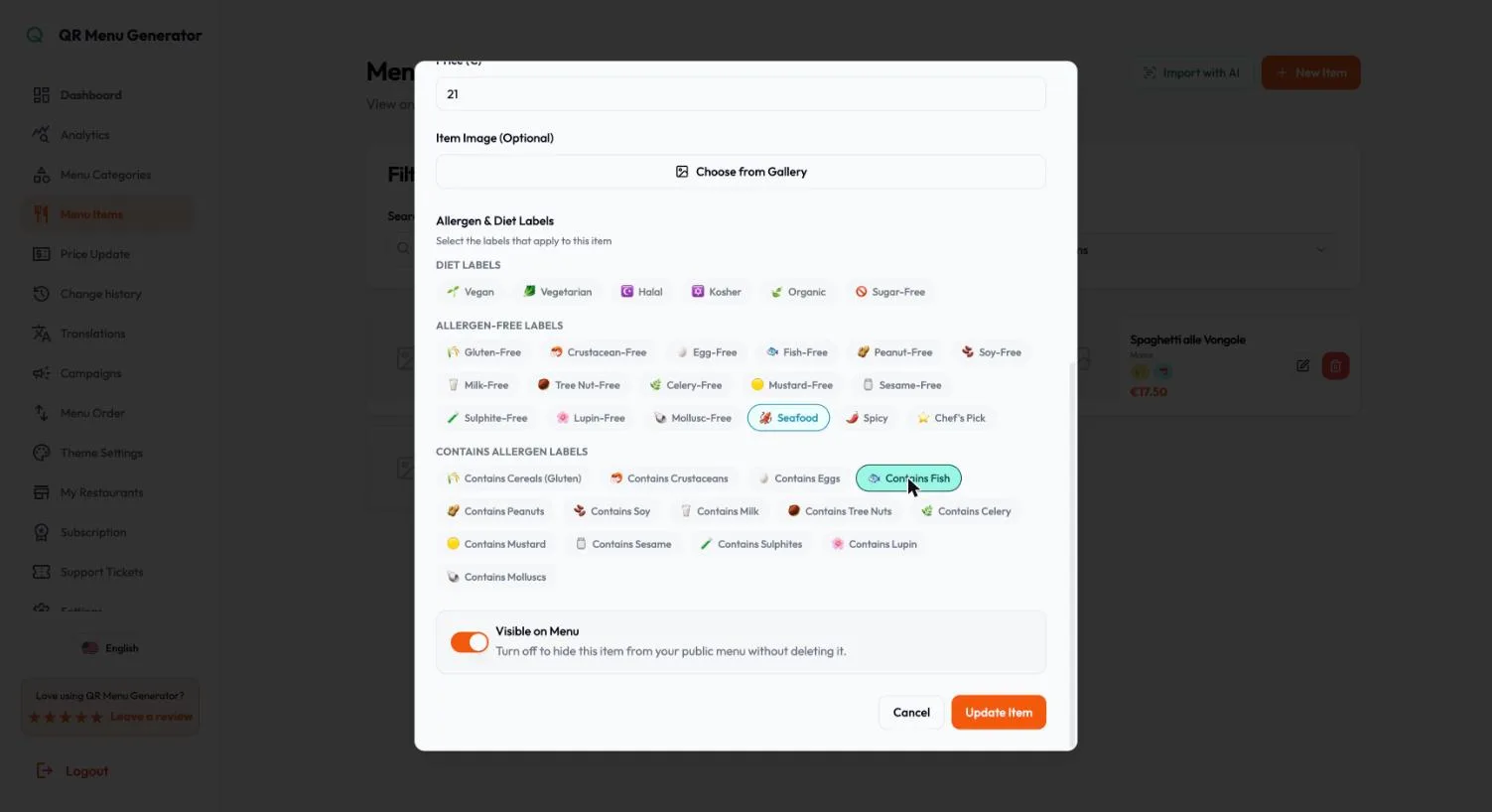
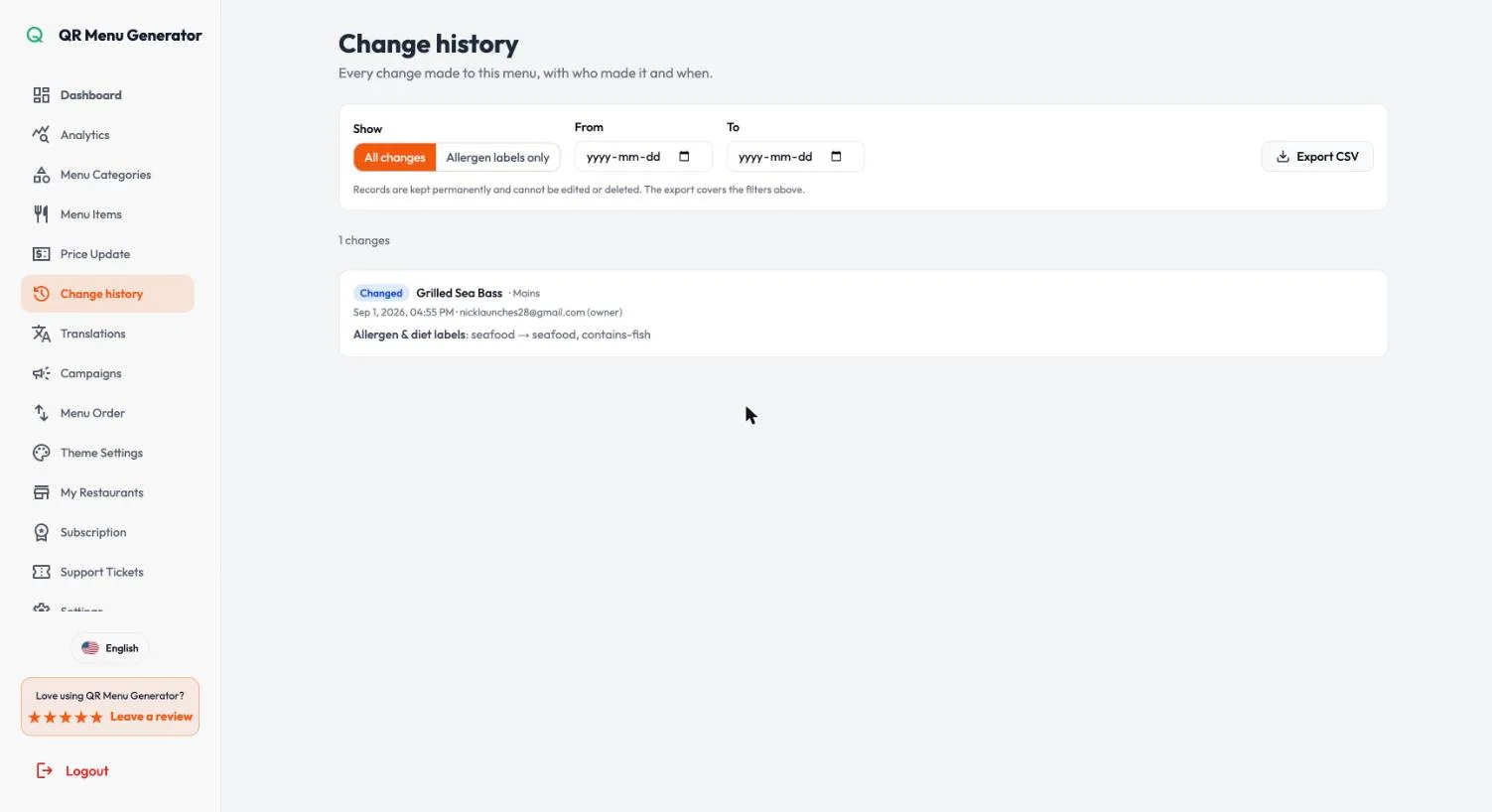
I gave the sea bass its "Contains Fish" label and saved. That created the first entry in a new sidebar page, Change history, which lives at /dashboard/audit-log. The entry has a timestamp, the account that made the change with its role, the dish and category, the field that changed, and the old and new value: "Allergen & diet labels: seafood → seafood, contains-fish". There is a toggle to show allergen-label changes only, a date range, and an Export CSV button. The CSV downloaded with columns for UTC timestamp, restaurant, changed by, role, type, category, item, action, changes and source. The page says records are kept permanently and cannot be edited or deleted. I did not try to test that claim.
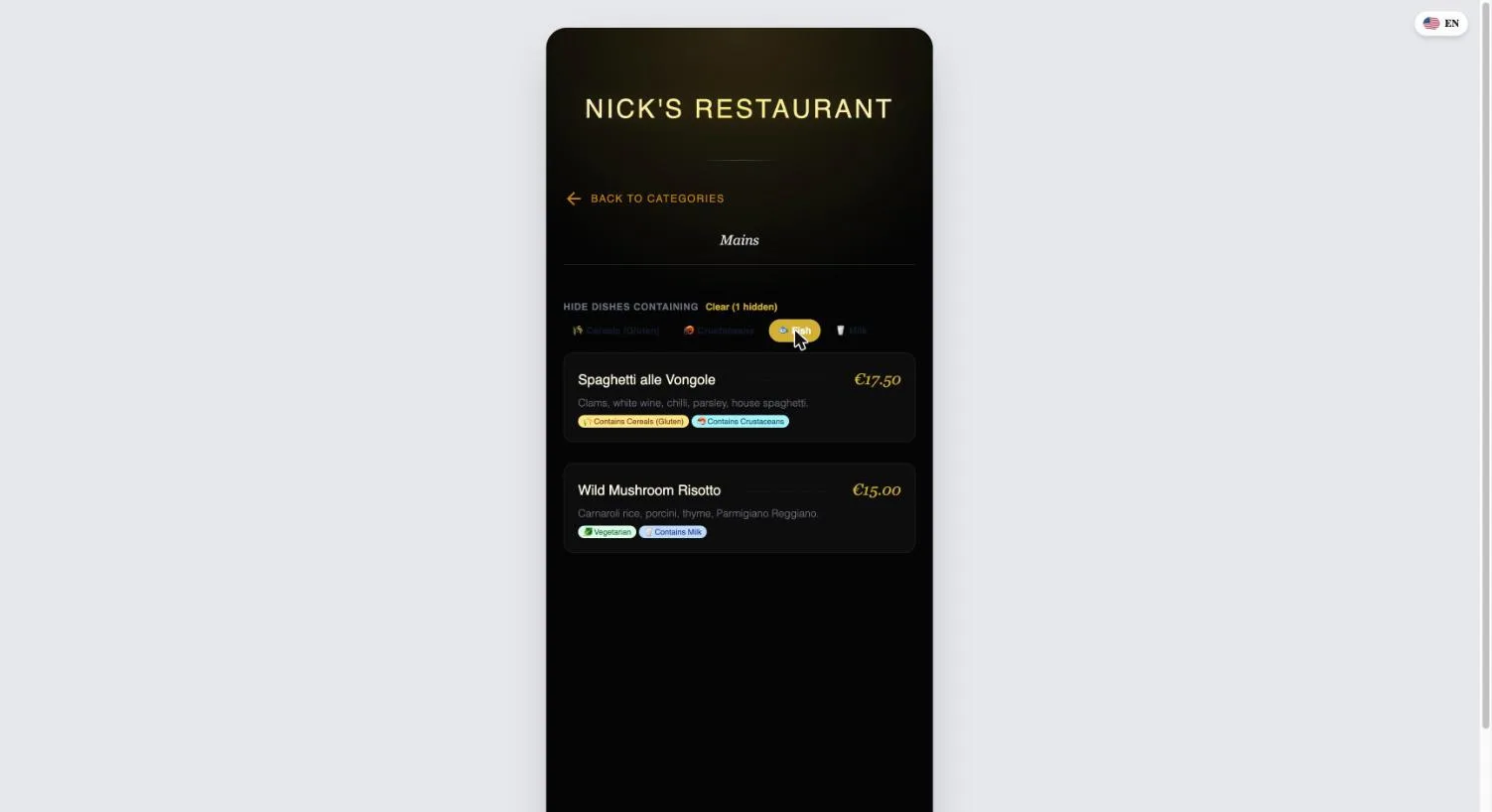
On the guest menu, each category now has a "Hide dishes containing" row listing the allergens present in that category. I tapped Fish and the sea bass disappeared, with a "Clear (1 hidden)" control to undo it. Going back to Starters, the selection was still active. A guest with a fish allergy can hide fish once and browse the whole menu.
Those were the three things I said had to be true for the rating to move. All three are true now.
What is still open. Two things, one of them the vendor flagged himself.
The compliance page still says "System validates coverage and flags missing information." It does not. I created a dish with a name, a category and a price, no labels of any kind, and pressed save. "Item created", no warning, no flag, nothing. The vendor knows this and told me it is on the list. Until it ships, that sentence should come off the page, because a restaurant reading it will assume the software catches the mistake a busy kitchen will eventually make.
The second I found on the re-test. Change history logged the deletion of that unlabelled test dish as "Removed", with a timestamp and my account. It did not log the creation. So the audit trail today covers edits and deletions but not additions, which means the exact case the validation claim is about, a staff member adding a dish and forgetting the labels, leaves no entry to find later.
Smaller: the import claim on the same page now reads "from a photo or PDF and let AI read it", and there is an Import with AI button in the dashboard to match. I did not test it, so I am not counting it either way.
To be fair to them, as before: the page carries a disclaimer that it is not legal advice, the regulatory summary is accurate and properly sourced to the European Commission, and the labels render clearly on the guest menu. What has changed is that the tagging system underneath the badge is now the one the badge describes. That is the difference between the first version of this review and this one.
What else you get
Bulk price update. Every dish across every category on one screen, current price on the left, a new-price box on the right, one save. On 25 August that was the whole feature, and I noted there was no "raise everything by 4%", which is the actual job when supplier costs move. There is now. A percentage field at the top, "Apply to all", and it fills every box for review: at 4%, my 7.00 became 7.28, 17.50 became 18.20, 21.00 became 21.84. A toast says "Nothing is saved until you press Update", and nothing was. You can still override single rows before committing.
QR customization. Colour, three shape styles, optional centre logo, and the change applies to the existing code rather than issuing a new one. On 25 August the download was PNG only, which was the wrong way round given the free anonymous tool on the site offered SVG. Now the customize modal offers PNG, SVG and PDF. The SVG is a real vector file, 1200 by 1200 units of paths, and it is what you want for table tents. The PDF is a single A4 page, but the code on it is a JPEG at roughly 200 dpi, not vector, so if you are sending a file to a printer, send the SVG.
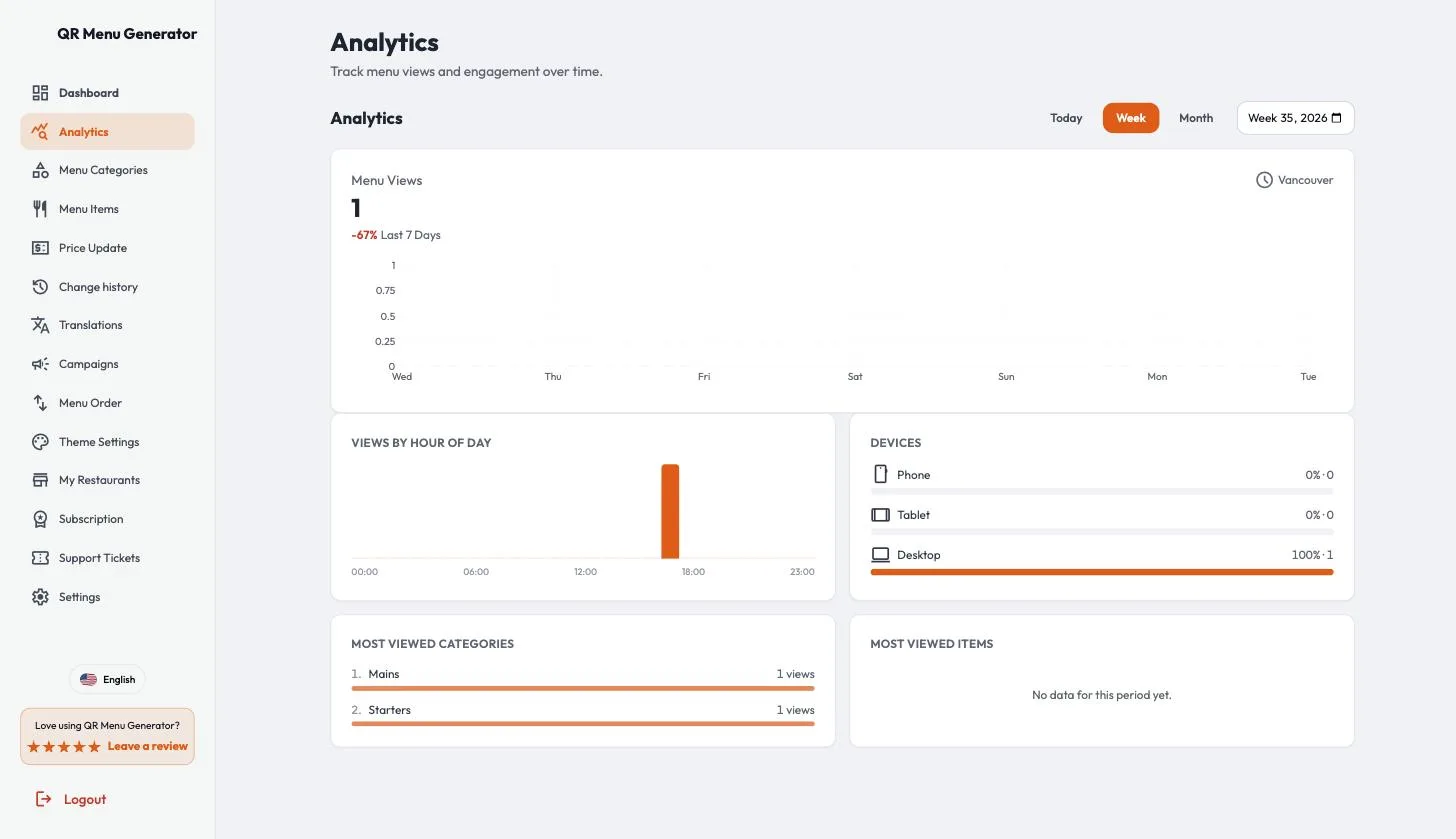
Analytics. On 25 August this was one card, one metric: menu views over time. The pricing page sold it as "Advanced analytics and insights", which it was not. The page now has four panels under the views chart: views by hour of day, a phone, tablet and desktop split, most viewed categories, and most viewed items. My account has almost no traffic, so the items panel read "No data for this period yet" while the categories panel showed my two visits. It is now a reasonable analytics page rather than a view counter, and the marketing line is no longer an overstatement.
The rest. Pop-up campaigns tied to scans, a menu reorder screen, a built-in WiFi QR generator, one staff invite per restaurant, unlimited restaurants on Pro Plus, and support tickets in-app. Seventeen guest languages in the switcher, which is more than the eleven the homepage advertises, and a rare case of a product underselling itself.
The guest experience
This is better than the dashboard. The public menu loads fast, shows the restaurant name, then large tappable category cards, then dishes with description, price and label chips. No cookie wall, no app prompt, no interstitial. On a phone it reads well and the dark themes look genuinely good. The allergen filter sits above the dish list and does not get in the way if you ignore it.
On 25 August prices dropped trailing zeros, so a single menu showed €16.50 next to €21 and €15, which looked like a bug to a diner. On 1 September the same menu showed €17.50, €21.00 and €15.00. Fixed. And the "instant updates" promise is real: I changed the currency and two prices from the dashboard and the live menu reflected all of it immediately on the same URL and the same QR. That claim, at least, was exactly as advertised from the start.
Pricing, and the credits
Free is $0: one restaurant, five categories, twenty products, ten thousand monthly views. Pro is $9.90/month. Pro Plus is $17.99/month and adds unlimited restaurants, multi-location and an SLA. The $19 and $29 on the pricing page are struck-through compare-at prices, not a second rate: the real prices are fixed, and yearly billing gives you two months free on either plan.
Those are real published numbers on a real pricing page, which after the Wysera review I am contractually obliged to appreciate.
The wrinkle I originally wrote up here was AI translation. When I tested, the dashboard read "Translate with AI (0 credits)" on a live Pro Plus subscription, and the pricing FAQ described the credits as a one-time bonus that did not renew. Both turned out to be temporary. The zero was an artifact of my review account, which was assigned manually rather than through checkout, so the automatic grant never fired; the vendor has since added the 1,200 credits an annual plan includes. And the policy itself has been changed: plan credits now reset every billing period, 100 a month on monthly billing or 1,200 up front on annual, and the pricing page now says exactly that on the feature bullet instead of burying it in a FAQ.
Credit packs still exist for anyone who burns through the allowance:
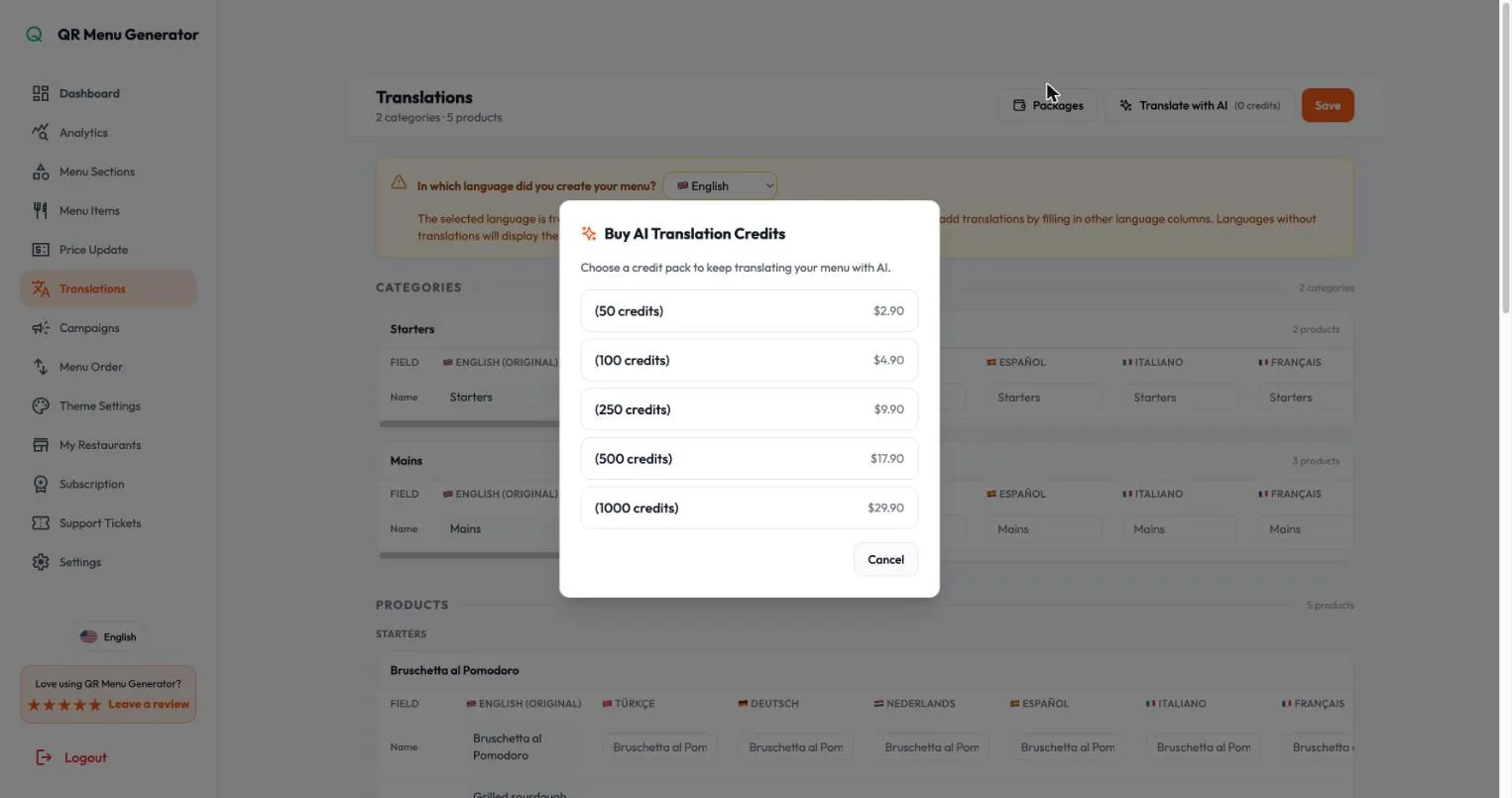
Packs run $2.90 to $29.90, never expire, and are only spent once the plan credits run out. That is the right order to spend them in, and having the bought ones outlive the billing cycle is the right call.
Manual translation stays free and unlimited, and the translations table is a decent grid: every field, every language, side by side. If you have one bilingual staff member, you do not need the credits at all.
How their comparison page holds up
/qr-menu-generator-vs-competitors is badged "Unbiased Comparison" and puts QR Menu Generator against Menubly, MenuTiger and NordQR across five rows. I checked all three competitors' live pricing pages on 25 August 2026. The footnote on their table said "Last updated March 2026", and it showed.
The price row was not on a consistent basis. The row's own subtitle said "Starting monthly price (billed annually)". QR Menu Generator's $9.90 is its flat monthly price, so it sits on that basis fine. But MenuTiger's $17 is its monthly rate (annual is 15% off, roughly $14.45) and NordQR's $14 is its monthly rate (annual is $12). So the rivals were quoted at list on a row that claimed annual pricing. Corrected to the row's own stated basis, the gaps narrow: NordQR lands about two dollars above QR Menu Generator, not four.
The Menubly price was simply out of date. The table and the FAQ both said Menubly starts at $9.99/month. Menubly's published Pro tier today is $7.99/month billed yearly, at $95.99 a year. The page then asks "What is the cheapest QR menu app for restaurants?" and answers with itself. On today's numbers the cheapest paid plan in that comparison is Menubly's.
Two Menubly rows looked unsupported. "Unlimited Products: No" does not correspond to any published item cap I could find. "Multi-location: No" sits awkwardly next to Menubly's Custom tier, which sells unlimited built-in menus and unlimited QR code menus.
The rows are chosen so the host wins all five. Every competitor ships something material that has no row at all. Menubly has commission-free online ordering, WhatsApp ordering, 100+ payment methods, a custom domain and PDF-to-menu conversion. MenuTiger has QR and online ordering, three payment processors, a kitchen display system, table management, and POS, Canva and Zapier integrations. NordQR has Magic Scan, which turns a photo or PDF of your existing menu into an editable digital one, plus Google Reviews sync, reservations, printable menus and physical QR stickers in the box. QR Menu Generator has none of these. A five-row table where the host wins every row is a marketing asset. Calling it "Unbiased Comparison" is the part I would change.
And the allergen row was the one my first test undercut. It is the strongest row on the page, QR Menu Generator "Yes" against Menubly and MenuTiger "No". NordQR is also marked "Yes", and NordQR puts allergens on every plan including the free one, with a dish limit of 20 that matches QR Menu Generator's own free tier. After the re-test, the QR Menu Generator "Yes" is earned. Against NordQR, the honest position is parity on labels, with QR Menu Generator ahead on the change log and the guest filter.
One more, on the same page as of 25 August: the hero said "4.9 · Rated by 5,000+ restaurants". Scroll down about one screen, on that same page, and the testimonial block said "500+ restaurants" and "4.8 / 5 average rating", which is what the homepage and pricing page also say. Two different rating counts, an order of magnitude apart, roughly four hundred pixels from each other.
A note on dates. The vendor revised this page on 28 August. The footnote now says the prices were checked against each vendor's own pricing page on that date on monthly billing, the hero now says "500+ restaurants", and the allergen row now reads "Yes (Pro)" against "Not listed" for the two rivals. I have not re-run the full comparison, so the paragraphs above describe the page as it stood on 25 August, and the points about row selection still apply to the revised version.
Smaller things that add up
One feature, several names. The button says "Create New Menu", it opens a page called "Menu Categories", and the dashboard counter calls the same things "Menu Categories" too. That is tidier than it was on 25 August, when the page was "Menu Sections", the empty state said "Create Your First Category" and dishes were "Products" in one place and "Menu Items" in another. Dishes are now "Items" throughout. The one leftover is that a "Menu" in the button is a "Category" on the page it opens.
/demo is not a demo. It is a signup form headed "Start for Free". There is no way to see the product working before creating an account, which for a visual product is a missed conversion, not just a naming quibble. Still true on 1 September.
Customer menus are in the sitemap. sitemap.xml listed around forty /menu/<id> pages belonging to real accounts on 25 August, including abandoned ones that render a restaurant name and nothing else. That is thin indexable content pointed at your own domain, and it publishes which of your customers never finished setting up. Not re-checked.
The in-app plan summary is thinner than the marketing one. The Subscription page lists four Pro Plus features: unlimited sections, unlimited items, QR code generation, priority support. Multi-location, the thing Pro Plus actually exists to sell, is not among them. Not re-checked.
On 25 August several dashboard routes also carried the marketing homepage title in the browser tab. Every dashboard page I opened on 1 September had its own title, so that one is fixed.
Alternatives worth a look
- NordQR. The closest direct competitor. On allergen labels the two are now level, and NordQR still puts them on every plan including free. Its real edge is Magic Scan, which turns a photo of your existing menu into an editable one, plus physical stickers in the box. Free tier is 20 dishes, Lite $12/month billed annually. Weaker on themes and capped on dishes at every tier, and it has nothing like the change log.
- MenuTiger. A different category of product. If you want guests to actually order and pay from the QR, with a kitchen display and POS integration behind it, start here. Regular is $17/month and the free tier is genuinely restrictive at seven categories and seven items.
- Menubly. The value option, $7.99/month billed yearly, and the free plan includes commission-free online ordering and a small restaurant website. Less polished menu design, no allergen story.
- Or nothing. If you have one location, a stable menu and no allergen obligation, a well-made PDF behind a free static QR costs zero and never has a billing page. The case for paying starts when your prices change often.
FAQ
Is QR Menu Generator EU allergen compliant? As of the 1 September 2026 re-test, the tooling is there: all fourteen Annex II allergens as separate labels, a change history with who, what and when, a CSV export, and a guest-side filter. Two gaps remain. It will save a dish with no allergen label and not warn you, despite the compliance page saying otherwise, and the change history does not record when a dish was created. Compliance is still your process, not the software's. Check with your own food safety authority.
Is there a free plan? Yes, permanently: one restaurant, five categories, twenty products, ten thousand monthly views. The pricing page, homepage, comparison page and signup form all now describe it the same way.
Does the QR code change when I edit the menu? No, and this works exactly as advertised. I changed prices and the display currency and the live menu updated immediately on the same URL and the same code.
Is AI translation included in Pro? Yes. Plan credits reset every billing period: 100 a month on monthly billing, or 1,200 up front on annual. If you need more, packs cost $2.90 to $29.90, never expire, and are only spent once the plan credits run out. Manual translation into all seventeen supported languages is free and unlimited.
Can I take orders or payments through it? No. It displays a menu. If you need ordering, look at MenuTiger or Menubly.
Should you use it?
If you run one restaurant or cafe, you change prices a few times a year, and you want a digital menu that looks better than a PDF and takes an afternoon rather than a weekend, this is a reasonable $9.90 a month. The builder is quick, the themes are the best in this comparison set, edits really are instant, and the guest-facing menu is clean and fast. On those terms it did the job on 25 August and it does the job now.
What has changed is the other half of the pitch. The first version of this review scored it 3.8, and the missing 1.2 points were the gap between that product and the one being advertised: a view counter sold as deep insight, and eleven US-style allergen labels sold as the EU's fourteen, with no way to say a dish contains fish and no audit trail behind the "audit-ready" claim. I wrote that fixing the allergen work would move the rating. It has been fixed, I have checked it, and the rating is 4.5.
What keeps it off five is what is still open: the compliance page promises validation that does not exist, the change log misses dish creation, the print PDF is a raster, and /demo is a signup form. The first two matter because they sit exactly where a restaurant would rely on the software instead of its own checks.
There is a pattern here worth naming. My first draft had a gripe about AI translation sold as a feature but shipped as a one-time credit grant; the vendor changed the policy and credited my account before publication. Then the allergen section went up, and a week later the labels, the change log and the filter existed. Two rounds, two fixes, both flagged by the vendor himself. That is unusual, and it is the reason the rating moved as far as it did rather than by a fraction.
Buy it as a menu builder, which is good, and as an allergen labelling tool, which it now is. Keep your own checks for the part it still does not do.
Building something? Submit it on Nick Launches. Listing is free and the do-follow backlink is permanent. If you are working out where else to get listed, start with the launch directories list and the basic SEO guide.