The hardest money to earn is the first payment for a feature you have not built. The usual move is to build the paid tier, launch it and hope. There is a cheaper move: sell a small number of lifetime passes to the tier before it exists, with a refund promise, and let the sales tell you whether to build it.
Voyager, an agentic file browser for macOS, does this right now. Its free app is live. Its Plus and Pro plans are marked "Not yet available". Next to them sits an Early Supporter Pass: $200 once, for the first 100 buyers, Plus for life when it goes live, and a full refund before Plus launches. That is the whole pattern in one card. This guide takes it apart and rebuilds it on Stripe. I built the checkout in Stripe test mode on October 26, 2026, and the screenshots below are from that run.
Write the tier down in one line
A pass sells a promise, so the promise has to be small enough to keep. Voyager's Plus fits in one line: "Everything in Free. Connect one external app. Mount S3-compatible storage." Two features, both concrete. A buyer can tell whether they want it, and the team can tell when it is done.
| Voyager tier | Price | What it includes | Status |
|---|---|---|---|
| Free | $0 | File browser, saved searches, tabs, chat with your own agent about selected files | Available now |
| Plus | $10 a month, or $7 a month billed yearly | Everything in Free, connect one external app, mount S3-compatible storage | Not yet available |
| Pro | $20 a month, or $14 a month billed yearly | Everything in Plus, more external apps, store and sync your work in the cloud | Not yet available |
| Early Supporter Pass | $200 once, first 100 | Plus for life when it goes live, no recurring fee, full refund before Plus launches | On sale |
From voyager.fm, read October 26, 2026.
"Everything we build next" is not a tier. If you cannot write the features down, you cannot say when the pass is delivered, and every new idea becomes something a pass holder thinks they paid for. Sell the next tier, not the future.
Price the pass against the plan
Price the pass in months of the plan it replaces. At $10 a month, Voyager's $200 equals 20 months of Plus. At the yearly price, $84 a year, it is about 2.4 years. A buyer who expects to use the tier for three years or more comes out ahead. Voyager collects two years of revenue on day one, before it has built anything.
- Write down the monthly price you plan to charge for the tier.
- Multiply it by 18 to 24. Under 18 months you give away too much. Over 30 the pass stops looking like a deal.
- Check the total: price times cap. Voyager's ceiling is $20,000. If your total would not pay for building the tier, raise the price or rethink the tier, not the cap.
A $49 lifetime deal brings in buyers who wanted a bargain, and they stay on your servers forever. A pass priced at roughly two years of the plan brings in people who already expect to use it, which is the group whose feedback you want while you build.
Cap it, and let Stripe close the door
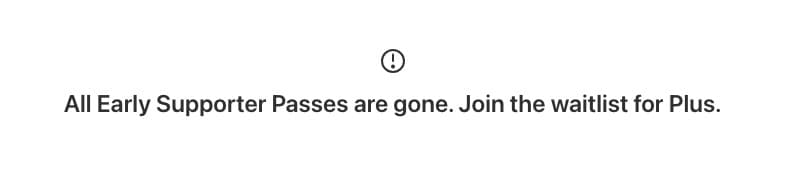
A cap only works if the checkout stops at the cap. Stripe Payment Links do this on their own: set a payment limit, and when the last payment completes, the link deactivates and shows your message instead of the checkout. No inventory code.
- In the Stripe Dashboard, create a product called "Early Supporter Pass" with a one-time price.
- Create a Payment Link for it. Under the options, turn on Limit the number of payments and enter your cap.
- Write the message people see once it is sold out. Point it somewhere useful, like the waitlist for the tier.
- Add the refund promise as text under the Pay button, so it is on screen when they pay.
The same thing through the API, which is what I ran in test mode:
curl https://api.stripe.com/v1/payment_links \
  -u "sk_test_...:" \
  -d "line_items[0][price]=price_..." \
  -d "line_items[0][quantity]=1" \
  -d "restrictions[completed_sessions][limit]=100" \
  -d "inactive_message=All 100 Early Supporter Passes are gone. Join the waitlist for Plus." \
  -d "custom_text[submit][message]=Plus for life when it launches. Full refund any time before then, just reply to your receipt." \
  -d "metadata[offer]=early_supporter_pass"

# "restrictions": { "completed_sessions": { "count": 0, "limit": 100 } }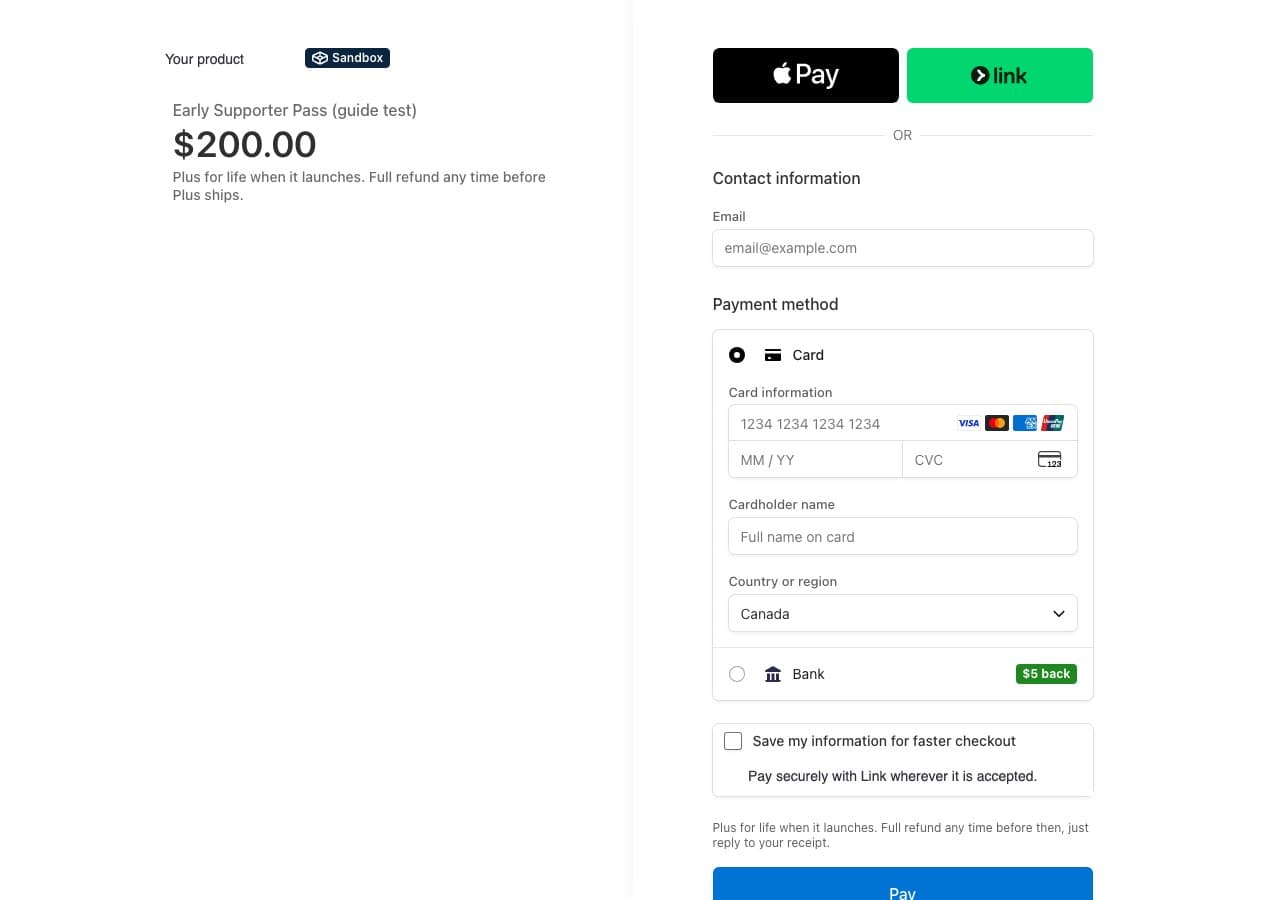
Then I proved the cap. I made a second link with a limit of 1 and paid it with Stripe's test card. The link's count went from 0 to 1, active flipped to false, and opening the link again showed only the sold-out message:
Checkout Sessions you create in code have no built-in cap. Count completed passes in your own database when the webhook arrives, stop creating sessions at the cap, and refund anyone who slipped in at the same moment.
Promise the refund, and price in what it costs
"Full refund before Plus launches" is what makes a $200 pre-order easy to say yes to. It also tells the buyer exactly when their money is no longer at risk: the day the tier ships. Put it on the pricing card, under the Pay button and in the receipt.
- Stripe keeps its fee. Stripe's refund documentation says its processing fees from the original payment are not returned. Budget for that on every refunded pass.
- Quick refunds are cheaper. A refund issued shortly after the charge goes through as a reversal, and Stripe withholds no fees on a reversal.
- Refund before they dispute. You cannot refund a payment while a dispute on it is open, and a dispute adds its own fee. Answer refund emails the same day.
- Expect a closer look. Stripe's account review FAQ says businesses that take payment before delivery are more likely to see disputes, and that Stripe may hold part of each payment in reserve. A clear delivery condition and fast refunds keep you out of that bucket.
A refund that needs a form, a reason and a waiting period turns into a chargeback. "Just reply to your receipt" is the whole policy.
Turn the payment into lifetime access
Stripe's entitlements feature is built around subscriptions. A pass is one payment, so the simplest model is a flag on the user, set from the webhook and read wherever you gate the tier:
const event = stripe.webhooks.constructEvent(body, signature, webhookSecret);

if (event.type === "checkout.session.completed") {
    const session = event.data.object;
    if (session.payment_link === PASS_LINK_ID && session.payment_status === "paid") {
        await db.users.updateOne(
            { email: session.customer_details?.email },
            {
                $set: {
                    lifetimePlan: "plus",
                    passPaidAt: new Date(),
                    passPaymentIntent: session.payment_intent,
                },
            },
            { upsert: true },
        );
    }
}- Match on the Payment Link's id, not the amount. Prices change, the link id does not.
- Store the payment intent next to the flag. A refund then becomes one lookup: refund it, clear the flag.
- Upsert by email, because pass buyers may not have an account yet. When they sign up with that email, they already have Plus.
Tell buyers what happens next
A pre-order buyer has paid for something they cannot use yet. Silence is what turns that into a refund request.
- Say what triggers delivery. Voyager's condition is "when Plus goes live". A date is better if you can keep it. If you cannot, say so and give the next update date.
- Give pass holders the work in progress. Early builds, a private channel, a changelog they see first. Voyager ships its free app's changelog in public, with releases on October 21, 24 and 26.
- Honor the 14 days. In the EU and the UK a consumer can withdraw from an online purchase within 14 days without a reason. The exception for digital content needs delivery to have started, and a pre-order has not started. Your "full refund before launch" already covers it.
- Never redefine "lifetime". Lifetime of the Plus tier as you described it on the day they paid. If Plus later splits in two, pass holders keep everything they bought.
Obsidian sells Catalyst, a one-time $25, $50 or $100 license that gives early access to insider builds and unlocks no app features at all. People pay to support the app and get in early. If you are not ready to promise a tier, that is the softer version of the same idea.
Pass, or an AppSumo lifetime deal?
Both sell lifetime access for one payment. They solve different problems.
| Your own pass | AppSumo lifetime deal | |
|---|---|---|
| Who brings the buyers | You: your list, your users, your posts | AppSumo's audience |
| What you keep | The price, minus Stripe's fee | A revenue share AppSumo negotiates per product |
| When you get paid | On Stripe's normal payout schedule | About 60 days after the end of each sales month |
| The buyer relationship | Yours from the first payment | You meet them when they redeem their code |
| Can it fund something unbuilt | Yes, that is the point | No, the product has to be live and accepted first |
AppSumo says about 10% of applicants are accepted. If you already have a few thousand users, a pass to them is faster, keeps the money, and tells you whether the tier is worth building. If nobody knows you yet, a pass has nobody to sell to, and a marketplace is the reach you are paying for.
The whole thing, in order
- The tier in one line, two or three features (1)
- Pass price at 18 to 24 months of the plan (2)
- Cap times price pays for the build (2)
- One-time price and a Payment Link (3)
- Payment limit and a sold-out message (3)
- Refund promise under the Pay button (3, 4)
- Webhook sets a lifetime flag (5)
- Refund the same day, no questions (4)
- Updates on a schedule you keep (6)
- Lifetime means the tier as sold (6)
Selling a pass works best to people who already know your product. Get it in front of more of them first: launch it on the weekly board, it is free and the listing is permanent, and run a site audit on the pricing page the pass will live on.
FAQ
Selling a pre-order is common, but the buyer keeps their rights. In the EU and the UK a consumer has 14 days to withdraw from an online purchase, and the usual exception for digital content only applies once you start delivering it with their consent, so a pre-order is fully refundable for 14 days. In the US the FTC's mail order rule covers goods, not services, but deception rules still apply. Say what the buyer gets and when they can get their money back, and keep that promise. This is not legal advice.
Pick the number you could serve personally if every buyer emailed you in the same week, and the number that would pay for building the tier. Voyager chose 100, which caps the money at $20,000. A small cap also makes the pass worth something: it is gone when it is gone.
Yes, with a Payment Link. Turn on 'Limit the number of payments' in the Dashboard, or set restrictions[completed_sessions][limit] in the API. When the limit is reached the link deactivates and shows your message instead of the checkout. I tested it with a limit of one: one test payment, and the link switched itself off.
Stripe's documentation says its processing fees from the original payment are not returned on a refund. The exception is a refund issued shortly after the charge, which goes through as a reversal with no fee withheld. A chargeback costs more: a dispute fee on top, and you cannot refund while the dispute is open.
Sell a pass when you already have an audience and want to keep the buyer relationship and the money. Run an AppSumo deal when you need reach you do not have. AppSumo takes a negotiated revenue share, pays out about 60 days after the end of each sales month to match its 60-day refund window, and you meet the buyer when they redeem.
Sources
- Voyager pricing and FAQ, and its changelog, read October 26, 2026
- Stripe: Payment Links, limit the number of payments, Refunds, account review FAQ and Entitlements; the checkout was built and paid in Stripe test mode on October 26, 2026
- AppSumo's partner page for revenue share, payout timing and acceptance rate
- EU Consumer Rights Directive, article 9 and article 16, and the FTC's guide to the mail order rule
- Obsidian Catalyst
Disclaimer: Nick Launches is not affiliated with Voyager, Stripe, AppSumo or Obsidian. Prices and terms are as published on October 26, 2026 and change. This guide is not legal or tax advice; check the rules where your buyers live.