Every agent session starts from zero. The useful thing Claude Code worked out on Monday lives in a chat you will never open again, and on Tuesday Codex asks you to explain the project from the top. The fix people reach for is a shared store the agents can read and write. Then the real question shows up: would you let an agent write to your data with nobody looking?
Busabase is an open-source (MIT) database and workspace built around that question. Agents and people share the same records, docs, skills and apps, and every agent write travels as a Change Request: a message, an author, a field-level diff and a history. Your permissions decide whether a change merges on the spot or waits in your inbox.
I installed version 0.95.1 on a Mac with a fresh data directory and ran every command below against it, including the agent writes over MCP. Where the behaviour surprised me, there is a callout.
Start Busabase
- Command
- npx busabase server
- URL
- http://localhost:15419
- Data
- ~/.busabase/data (PGlite + files)
One command, no database, no account, no config file. It starts an embedded PGlite database and local file storage:
npx busabase server

#   ➜  Server   http://127.0.0.1:15419
#   ➜  Data     ~/.busabase/data
#   ➜  Access   bound to 127.0.0.1, this machine only
Open http://localhost:15419 and you land on the dashboard. The flags you will actually use are --port, --data for a different data folder, and --host. Other ways to run the same thing:
# Docker (also on GHCR as ghcr.io/busabase/busabase)
docker run --rm -p 15419:15419 -v ~/.busabase/data:/data busabase/busabase

# Global install
npm i -g busabase && busabase server

# A second, throwaway workspace on another port
npx busabase server --port 15420 --data ~/busabase-sandbox
There is also a desktop app for macOS, Windows and Linux at busabase.com/download, which runs the same local workspace without a terminal.
node >=24.18.0. On 24.13 the server still started for me, with a wall of EBADENGINE warnings. Upgrade Node or use Docker so you are not debugging that later.GET /api/v1/bases returns []). That is on purpose: the first agent you connect builds a starter workspace for you in step 2, or you build one yourself in step 3.Connect your agent
- Easiest
- Paste the setup prompt
- MCP
- POST http://localhost:15419/api/mcp
- Scripts
- OpenAPI at /api/v1/openapi.json
The easy way: let the agent onboard itself. The server publishes a setup skill at /SETUP_SKILL.md. Paste this into Claude Code, Codex, Cursor, Gemini CLI or anything else that can read a URL:
Read and follow the Busabase Agent Skill, it is the single source of truth:
http://localhost:15419/SETUP_SKILL.md

Follow its onboarding to connect to this workspace. Don't choose a merge policy
yourself unless I ask for one: submit the change and let Busabase apply my
permissions to decide whether it merges now or waits for review.
The skill walks the agent through four milestones: connect, initialize a starter workspace (it offers Content Pipeline, Compliance Checklists, Knowledge Base, CRM Contacts, or a custom one), verify, and install the permanent skills. It asks you one lettered question at a time, so you stay in charge of what gets built.
The MCP way: give the agent typed tools. The local server speaks MCP over Streamable HTTP at /api/mcp. On 0.95.1 it lists 99 tools: bases, records, docs, file trees, search, comments, and the Change Request tools. Add it once per client:
claude mcp add --transport http --scope user busabase http://localhost:15419/api/mcp{
"mcpServers": {
"busabase": { "url": "http://localhost:15419/api/mcp" }
}
}[mcp_servers.busabase]
url = "http://localhost:15419/api/mcp"The server's own instructions tell the agent to call auth_verify first and then playbooks_search with your request, so it looks for a saved playbook before it improvises. That is the habit you want.
The script way. Every operation is also a REST endpoint: the spec is at /api/v1/openapi.json and a Swagger page at /api/v1/doc. To save the connection for the CLI and the installed skills, run:
npx busabase-cli login --base-url "http://localhost:15419"/api/mcp in a browser returns 405. MCP clients POST to it. If you want to check it by hand, send an initialize request with curl -X POST and an accept: application/json, text/event-stream header.Build your first Base
- Base
- A table of typed fields
- Calls
- 1 folder + 1 Base
- Or
- busabase-cli install <template>
A Base is a table with typed fields: text, longtext, markdown, number, date, select, multiselect, url, email, attachment, relation and more. You can ask your agent to make one, click it together in the UI, or do it in two calls. Here is a small sales pipeline, folder first so the sidebar is not a flat list:
# 1. A folder (structure changes are Change Requests too)
curl -X POST http://localhost:15419/api/v1/nodes/change-requests \
  -H 'content-type: application/json' \
  --data '{"message":"Create the Sales folder","autoMerge":true,
           "operations":[{"kind":"create","nodeType":"folder","slug":"sales","name":"Sales"}]}'
# -> read mergeSummary.mergedNodeIds[0], that is the folder id

# 2. The Base inside it
curl -X POST http://localhost:15419/api/v1/bases \
  -H 'content-type: application/json' \
  --data '{
    "slug": "leads", "name": "Leads", "parentNodeId": "<FOLDER_ID>", "autoMerge": true,
    "fields": [
      { "slug": "name",    "name": "Name",      "type": "text", "required": true },
      { "slug": "company", "name": "Company",   "type": "text" },
      { "slug": "stage",   "name": "Stage",     "type": "select",
        "options": { "choices": [
          { "id": "lead", "name": "Lead", "color": "slate" },
          { "id": "qualified", "name": "Qualified", "color": "amber" },
          { "id": "customer", "name": "Customer", "color": "emerald" } ] } },
      { "slug": "deal",    "name": "Deal size", "type": "number" },
      { "slug": "notes",   "name": "Notes",     "type": "longtext" }
    ]
  }'
Add a few rows the same way, one call per record:
curl -X POST http://localhost:15419/api/v1/bases/<BASE_ID>/change-requests \
  -H 'content-type: application/json' \
  --data '{"fields":{"name":"Dana Ortiz","company":"Northwind Labs","stage":"lead","deal":4800},
           "message":"Add Dana Ortiz from the inbound form",
           "idempotencyKey":"seed:v1:dana","autoMerge":true}'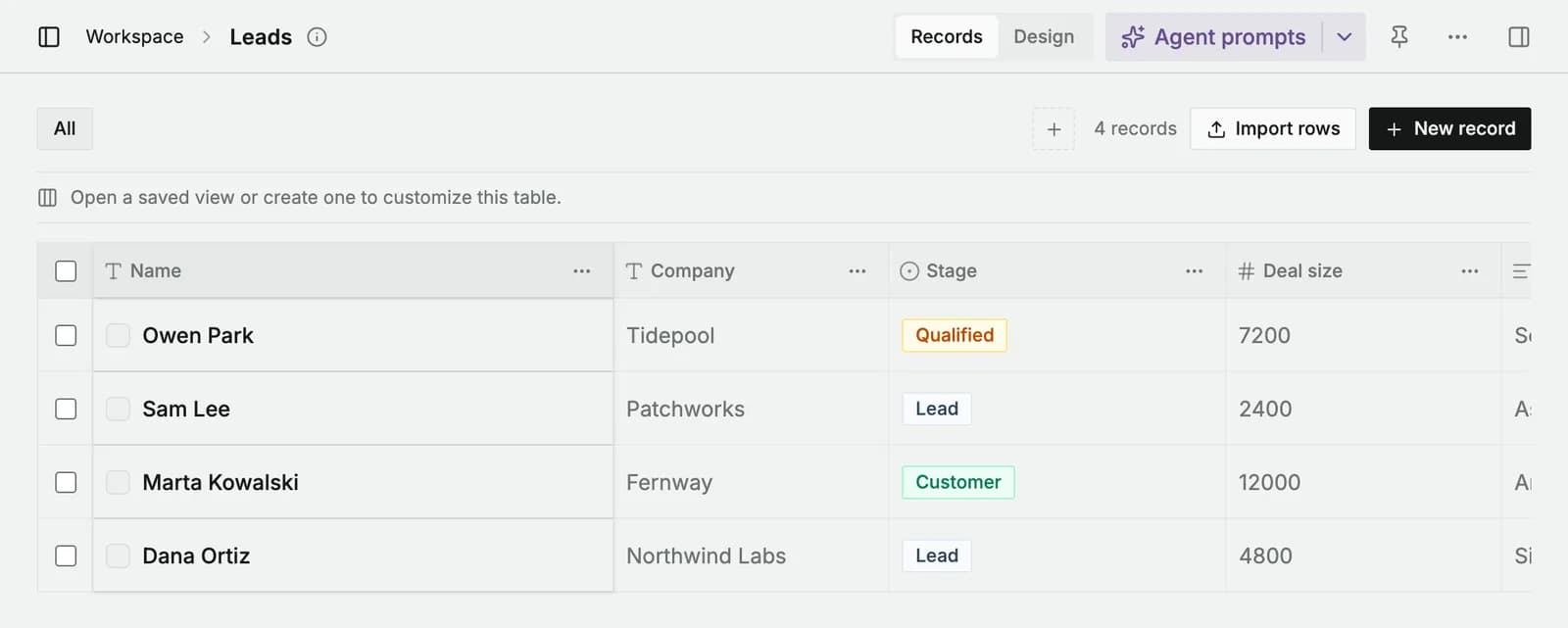
Or start from a template. A template is a whole working setup: Bases, views, docs, sample data, apps, and a manual that tells the agent how to use them. The local catalog lists 64 of them at /api/v1/templates, from a CRM to a CMS to a feedback tracker. Install one with the CLI:
npx busabase-cli install https://github.com/busabase/templates/tree/main/templates/busa-crmDecide which writes wait for you
- Local default
- You own it, so writes merge
- Hold an update
- requireReview: true
- Hold a create
- autoMerge: false
This is the step most people skip, and it is the reason to use Busabase at all. Every write is a Change Request, but whether it waits depends on permissions. On a local install you are the owner, so by default an agent's write merges straight away and simply leaves a diff and a history behind. To make writes wait for you, ask for review explicitly:
- Updating a record over MCP (
record_change_request): pass"requireReview": true. - Creating a record over MCP (
bases_create_change_request): pass"autoMerge": false. - Over REST,
"autoMerge": falseholds both creates and updates.
// tools/call record_change_request
{
  "recordId": "<RECORD_ID>",
  "operation": "update",
  "fields": { "stage": "qualified", "deal": 9600,
              "notes": "Signed up from the pricing page. Booked a demo for Thursday, team of 12." },
  "message": "Qualify Dana Ortiz: demo booked, team of 12",
  "requireReview": true
}
// -> "status": "in_review"
Put the rule where the agent reads it every session, in CLAUDE.md or AGENTS.md:
## Busabase
- Every write to Busabase waits for my review.
- Updates: record_change_request with requireReview: true.
- New records: bases_create_change_request with autoMerge: false.
- Write the message as "<verb> <what>: <why>", it is what I read in the inbox.
- Never call change_request_review or change_request_merge. Approving is my job.requireReview: true and it merged immediately. The create tool only honours autoMerge: false. If the Home page does not show your agent's new row as pending, this is why.changeRequest level can only propose: nothing it writes lands without a reviewer, whatever flags the agent sends. That is the setting to give agents in a shared workspace.Review the diff and merge
- Where
- Home → Waiting for your review
- Shows
- Before → after, per field
- API
- approve, then merge (two calls)
Pending changes show up at the top of Home under Waiting for your review and in the Inbox, with a count in the sidebar.
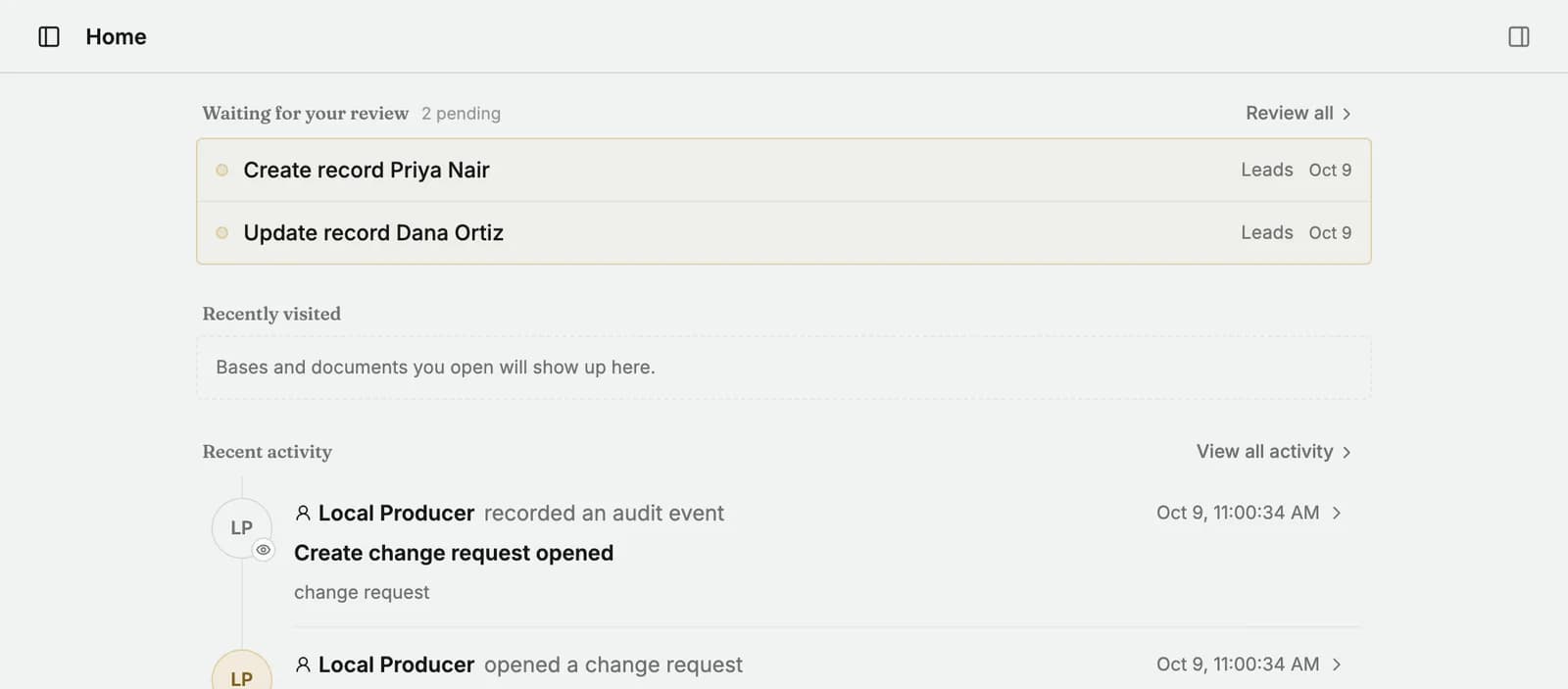
Open one and you get What will change: every field the agent touched, old value struck through, new value next to it, with the agent's message above. Approve, or choose Request changes and leave a note the agent can read. You can also edit the proposal before you approve it.
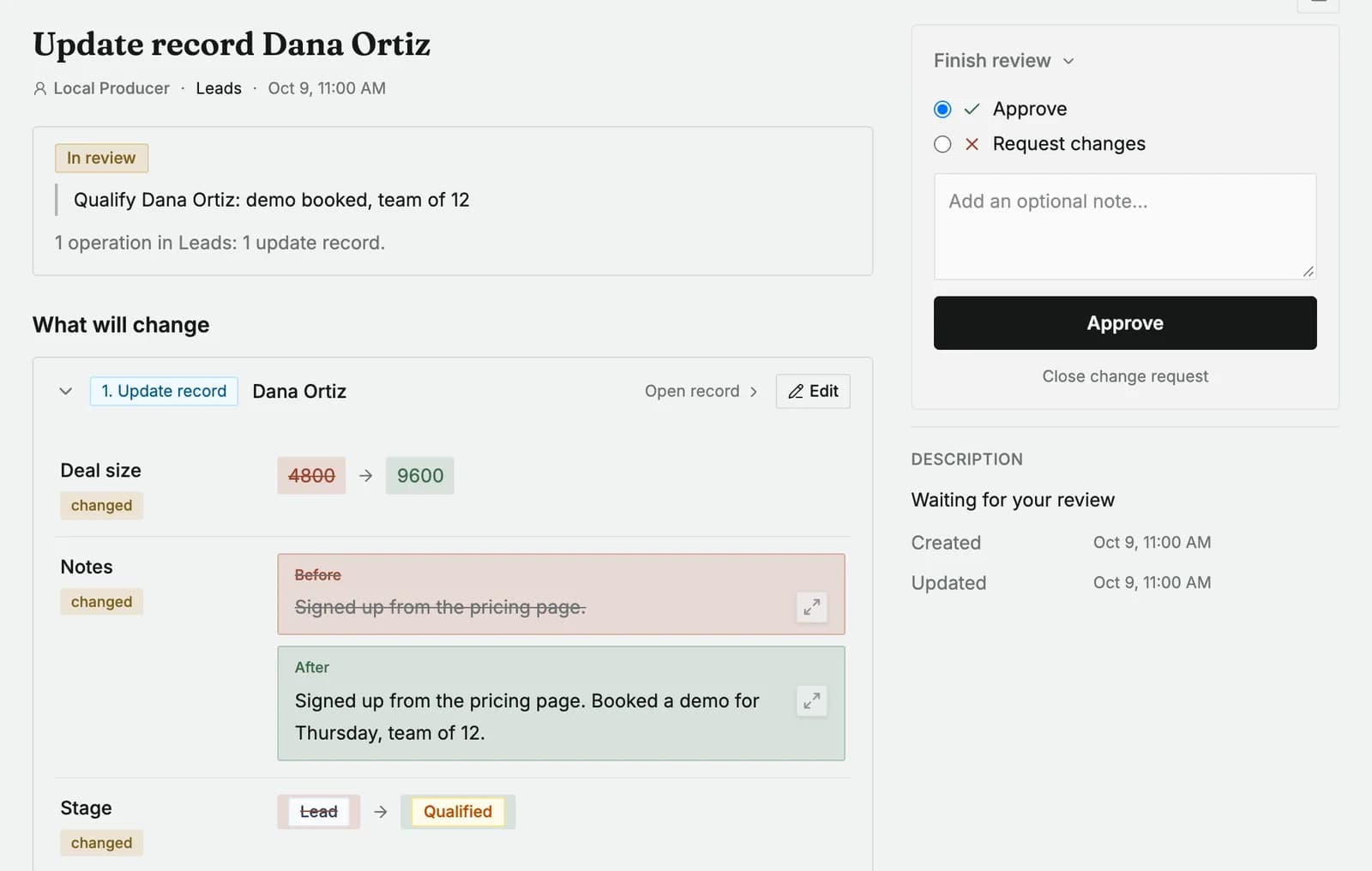
From a script, approving and merging are two separate calls, and that is deliberate: an approved change is not in your data until it is merged.
curl -X POST http://localhost:15419/api/v1/change-requests/reviews \
  -H 'content-type: application/json' \
  --data '{"verdict":"approved","reason":"Demo is on the calendar.","changeRequestIds":["<CR_ID>"]}'
# -> "status": "approved"   (not merged yet)

curl -X POST http://localhost:15419/api/v1/change-requests/merge \
  -H 'content-type: application/json' \
  --data '{"changeRequestIds":["<CR_ID>"]}'
# -> "status": "merged"
The MCP versions of those two tools say in their own descriptions that they record a human decision and must not be called unless you asked for that verdict on that change. Keep the line in CLAUDE.md from step 4 anyway. Busabase also has a mobile app for reviewing Change Requests away from the desk.
Read the history
- Per record
- Lineage, audit, review history
- Per workspace
- Home → Recent activity
- Each change
- Message, author, commit
Open the record and the right-hand panel shows who proposed it, the commit author, and the full review history: every Change Request that touched it, with its status and commit id. Home has the same feed for the whole workspace under Recent activity.
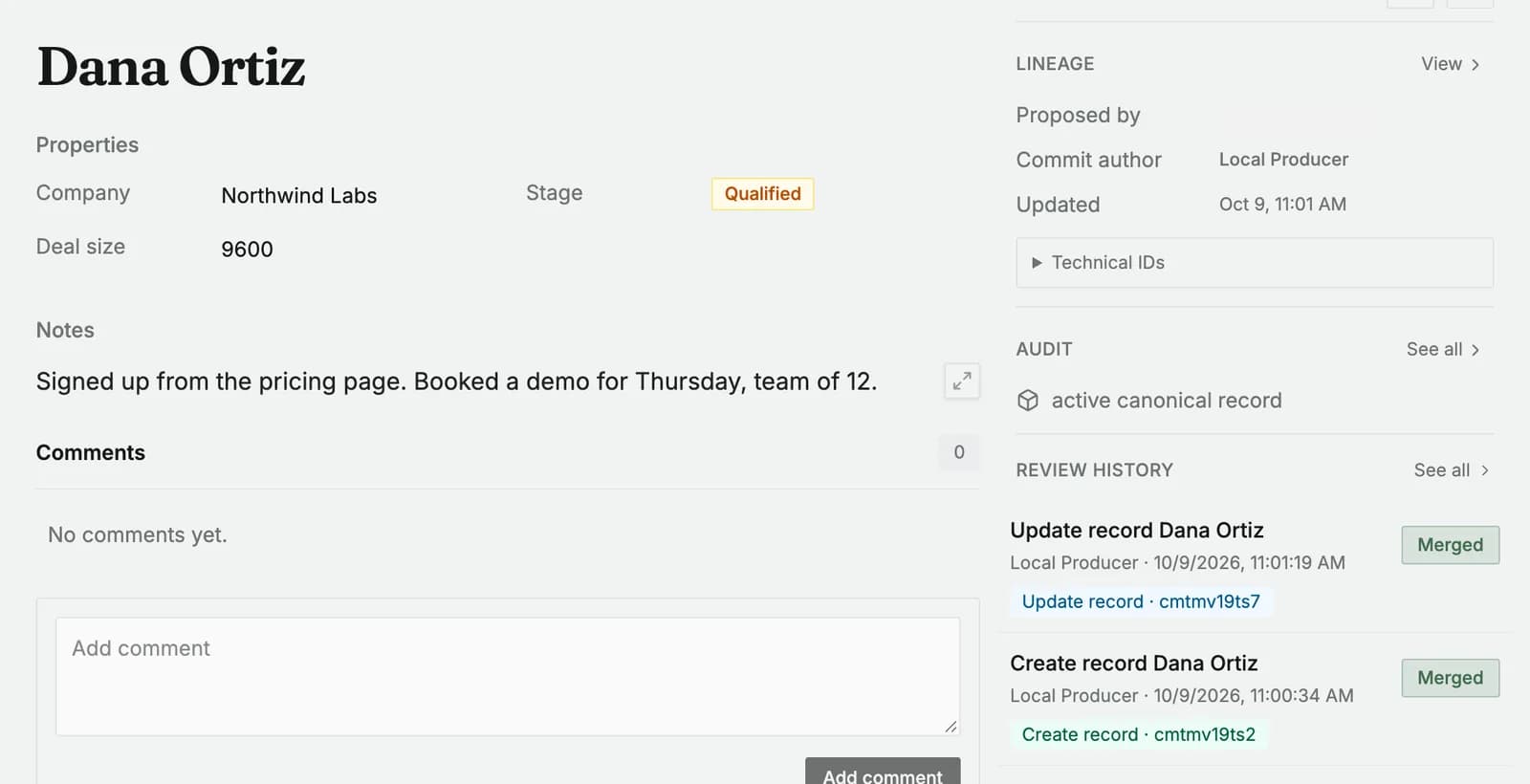
This is what makes the next agent useful. Ask a different agent "What changed on this project this week?" and it answers from these records and their history, not from your clipboard.
Keep it running, install the skills
- Skills
- busabase, busabase-app-creator
- On boot
- launchd / systemd --user
- Exposure
- 127.0.0.1 only, keep it that way
Install the two permanent skills so every new agent session knows the workspace without the setup prompt: busabase for everyday reads and writes, busabase-app-creator for building AirApps (dashboards, CRMs, content desks) on live Base data.
npx skills add busabase/skills --skill busabase busabase-app-creatorTo start the server at login on a Mac, a per-user launchd agent is enough:
<?xml version="1.0" encoding="UTF-8"?>
<!DOCTYPE plist PUBLIC "-//Apple//DTD PLIST 1.0//EN" "http://www.apple.com/DTDs/PropertyList-1.0.dtd">
<plist version="1.0"><dict>
  <key>Label</key><string>com.busabase.server</string>
  <key>ProgramArguments</key>
  <array><string>/bin/sh</string><string>-lc</string><string>npx -y busabase server</string></array>
  <key>RunAtLoad</key><true/><key>KeepAlive</key><true/>
</dict></plist>launchctl load ~/Library/LaunchAgents/com.busabase.server.plist
# Linux: a user service in ~/.config/systemd/user/busabase.service
# [Service]
# ExecStart=/usr/bin/env npx -y busabase server
# Restart=on-failure
# [Install]
# WantedBy=default.target
systemctl --user enable --now busabase.service
loginctl enable-linger "$USER" # keep it up without a login session127.0.0.1 by default, and --host 0.0.0.0 makes it reachable by anyone on the network. Use it on a trusted machine or private network only. For remote access, the project points to Cloud Connect, an authenticated tunnel from your machine to Busabase Cloud, or put it behind your own auth and reverse proxy.What it actually costs
- Busabase open source and the desktop app: $0, MIT licensed, data stays on your machine.
- Your agents: whatever you already pay for Claude Code, Codex or Cursor. Busabase has no model of its own.
- Busabase Cloud, if you want a hosted multi-user workspace with roles and web and mobile access: see busabase.com/pricing.
Troubleshooting
- EBADENGINE warnings on start. Node is older than 24.18. Upgrade, or run the Docker image.
- Port 15419 already in use. Another Busabase (often the desktop app) is running. Use it, or start a second one with
--portand its own--data. - Second server will not start on the same data. Only one process can hold a PGlite database at a time. Give each instance its own
--datafolder. - The agent's change merged without asking. Locally you have write access, so writes merge unless the agent sends
requireReview: true(updates) orautoMerge: false(creates). See step 4. - Approved over the API, but the record did not change. Approval is not a merge. Call
/api/v1/change-requests/mergewith the same id. - Update request rejected with "Invalid discriminator value".
POST /api/v1/records/<id>/change-requestsneeds"operation": "update"(ordelete,restore).
You're set
You now have one workspace that every agent on your machine reads from and writes to, and nothing lands in it without a message, a diff and a name attached. Start small: one Base your agents keep current, every write held for review for the first week, then loosen it for the fields you have stopped checking.
Building something on top of it, an AirApp, a template, an agent that keeps a Base current? Launch it on the weekly board: launching is free, every launch is reviewed by a person, and it gets a permanent listing page. Submit it here.
Disclaimer: Nick Launches is not affiliated with Busabase. Tested on Busabase 0.95.1 (npm) on macOS with a fresh data directory on October 9, 2026; the sample leads are made up. Commands and flags may change in later versions, check the README if something does not match.