Until last month, using Claude on an Android app meant two windows: Claude Code in a terminal guessing at Gradle, and Android Studio next to it with the build, the emulator and Logcat. On October 28, 2026, Google closed that gap from both sides. Android Studio Rabbit 2 runs your own coding agent inside the IDE, and the Android CLI became an official plugin for Claude Code and Codex, so the terminal gets the Android toolchain too.
This guide sets up both on a Mac and runs them on a new app, Launch Counter, from an empty template to a screen on the emulator that says "Hello from Claude Code".
Know what shipped
- Stable since
- October 28, 2026
- Agents
- 40+ over ACP
- In the IDE
- "This feature is in preview"
Two separate things shipped on the same day:
- Bring Your Own Agent (BYOA) in Android Studio Rabbit 2. Any agent that speaks the open Agent Client Protocol (ACP) runs in the IDE's agent window. Google names Claude Agent, Codex, Junie and Google Antigravity, and says more than 40 are supported, with access to the emulator, the build system and Logcat. ACP works like LSP for agents: the IDE starts the agent as a local process and they talk JSON-RPC over stdio.
- The Android CLI plugin for Claude Code and Codex. It adds one skill,
android-cli, that teaches the agent theandroidcommand: create projects, manage the SDK and emulators, build, run, capture the screen and read the layout.
One thing to know before you start: Google's blog calls BYOA stable, but the IDE still labels the agent settings and the agent picker "This feature is in preview". Expect it to change between releases.
Install Android Studio Rabbit 2
- Version
- 2026.2.2 Patch 1
- Mac download
- 1.5 GB DMG
- Signed by
- Google LLC
Run on a Mac for this guide
BYOA needs Rabbit 2. Check what you have first; the Mac used here had 2024.3, which is too old:
defaults read "/Applications/Android Studio.app/Contents/Info.plist" CFBundleShortVersionString
# 2024.3 here. Rabbit 2 reports 2026.2
Download the current stable release from developer.android.com/studio: Android Studio Rabbit 2, 2026.2.2 Patch 1. Inside Studio, Android Studio, Check for Updates gets you there too.
To keep an older Studio for a project that needs it, copy the new app to another folder under a different name instead of replacing it. Each version keeps its own settings folder. On this Mac, where an older Studio and the Android SDK were already set up, Rabbit 2 opened straight into the project with no setup wizard.
com.google.android.studio, so Spotlight and open -a may start the wrong one. Open the new one from its folder, or run its binary directly: ".../Android Studio Rabbit 2.app/Contents/MacOS/studio" path/to/project.Add Claude Agent from the marketplace
- Where
- Settings > Tools > AI > Agents
- Runs
- npx @agentclientprotocol/claude-agent-acp
- Sign-in
- Reused the Mac's Claude login
Run on a Mac for this guide
Open Android Studio, Settings, then Tools, AI, Agents. The Marketplace tab lists the agents, with four recommended at the top:
| Recommended agent | Version listed | What it is |
|---|---|---|
| Google Antigravity | 1.4.5 | Marked Official. Google's own agent, with Gemini |
| Claude Agent | 0.101.1 | ACP wrapper for Anthropic's Claude, run with npx |
| Codex | 2.6.0 | ACP adapter for OpenAI's coding agent |
| Junie | 3959.5.0 | JetBrains' coding agent |
The versions match the public ACP registry, which listed 45 agents on November 9, among them Cline, Cursor, Gemini CLI, GitHub Copilot, goose, Kiro CLI, Mistral Vibe and OpenCode. That is where the "40+" comes from.
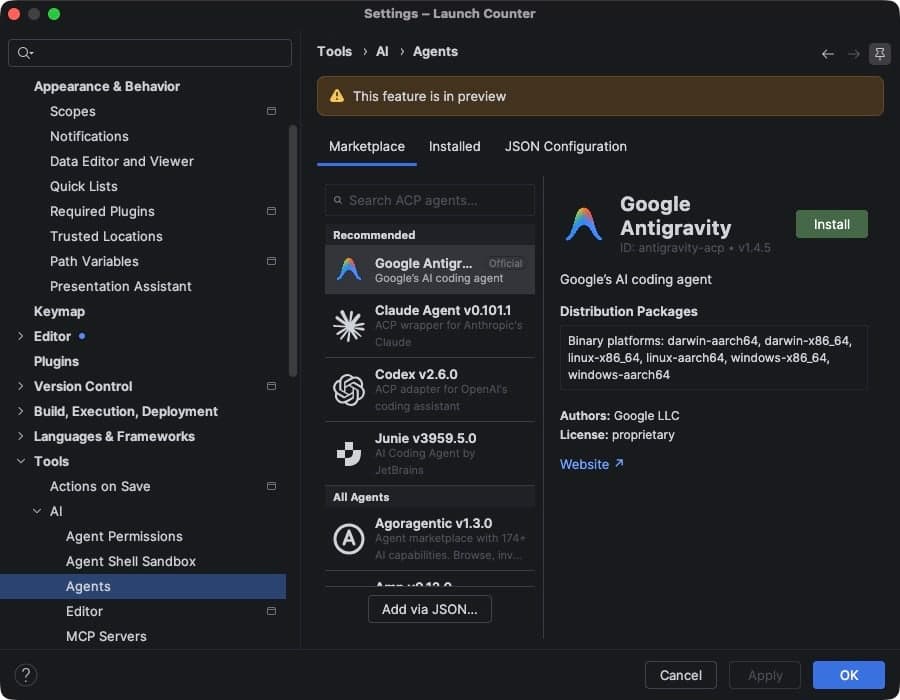
Select Claude Agent and click Install. It is not a download in the usual sense: Studio saves a command, npx -y @agentclientprotocol/claude-agent-acp, and runs it when you pick the agent. So you need Node.js with npx on the machine. The package is the ACP adapter for the Claude Agent SDK; the listing credits Anthropic, Zed Industries and JetBrains.
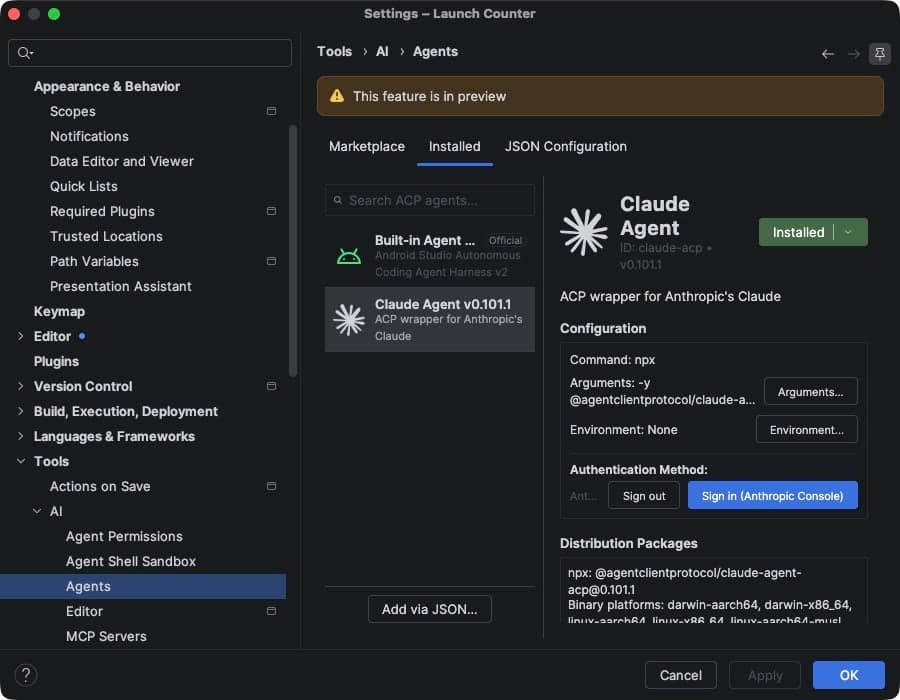
Under Authentication Method there is a Sign in (Anthropic Console) button for an API key. I did not use it. On this Mac, where Claude Code was already logged in to a Claude plan, the agent answered straight away with no sign-in step, as the next step shows. Google's notes say you can sign in with a subscription or an API key, subject to the agent's provider.
Pick the agent and give it a read-only task
- Where
- The Agent tool window
- Picker
- Top right of the panel
- Answered by
- Opus 5.5
Run on a Mac for this guide
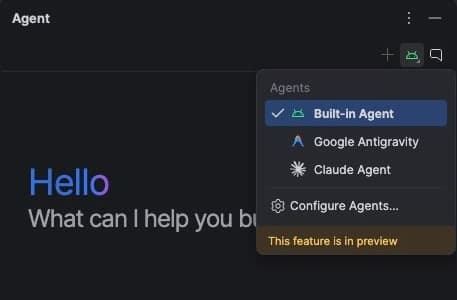
Open the Agent tool window and click the agent icon at the top right of the panel. The picker lists the built-in agent, Google Antigravity and every agent you installed.
Start with something that cannot change your code. I asked: "Read the code and tell me in three sentences what this app shows on screen and where that text comes from. Do not change any files."
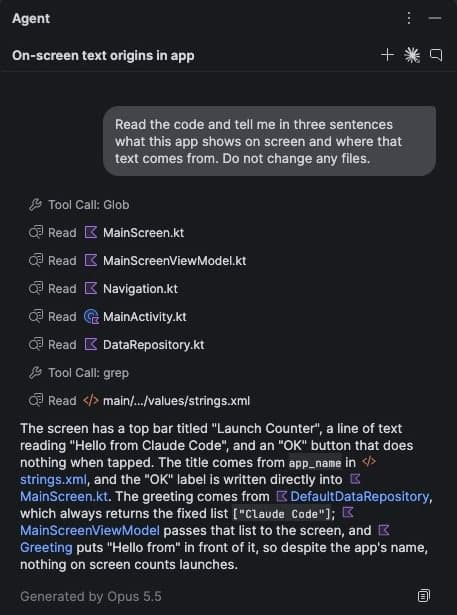
It read six files, found the strings, and added something I had not asked: despite the app's name, nothing on screen counts launches. That is the right kind of answer to get before you let an agent edit anything.
Let it build with the IDE's tools
- Tools
- mcp__ide-tools__studio_*
- Build
- :app:assembleDebug
- Result
- Build finished successfully
Run on a Mac for this guide
This is the part that a terminal agent does not get. I asked Claude Agent which Android Studio tools it had, and to build the debug variant without changing files. It listed the tools Studio hands it, all prefixed mcp__ide-tools__studio_, and ran the build through Studio's own Gradle tool:
| Group | Tools the agent listed |
|---|---|
| Files and editing | read_file, write_file, replace_file_content, multi_replace_file_content, list_files, find_files, view_file_outline |
| Code navigation | grep, code_search, find_declaration, find_usages, analyze_file |
| Gradle and project | gradle_build, gradle_sync, get_top_level_sub_projects, get_assemble_task_for_artifact, get_test_task_for_artifact, version_lookup and more |
| Shell | run_shell_command, interact_shell |
| Device and emulator | deploy, adb_shell_input, ui_state, take_screenshot, read_logcat |
| Compose and docs | render_compose_preview, search_android_docs, fetch_android_docs |
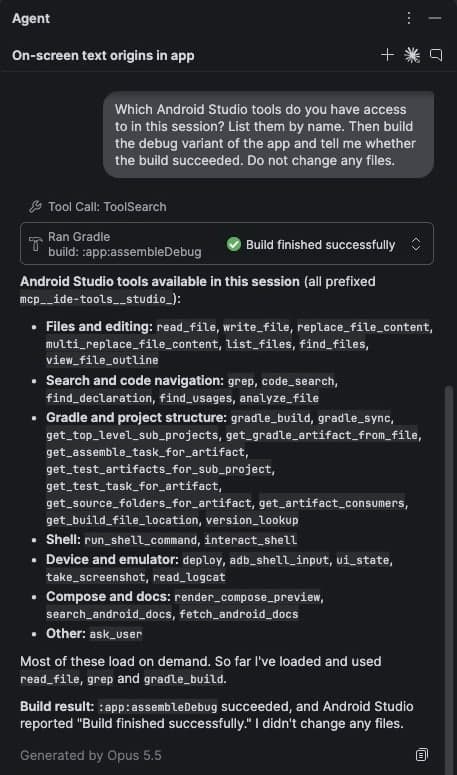
The tools load on demand. In this session it used read_file, grep and gradle_build. I did not run the emulator or Logcat tools from inside the IDE.
Outside the IDE: the Android CLI plugin
- Android CLI
- 1.1.16717390
- Plugin
- android-cli@android-cli-plugin
- Headless run
- 56 turns, 7.9 min
Run on a Mac for this guide
If you work in a terminal, or want an agent in CI, you do not need the IDE. Install the Android CLI first; the plugin only teaches the agent how to use it. Google's download page offers Homebrew (brew tap android/tap, then brew install android-cli), an install script, or the binary itself. I took the binary for Apple silicon, so nothing touched my shell profile:
curl -fsSL -o android https://dl.google.com/android/cli/latest/darwin_arm64/android
chmod +x android && mv android ~/bin/   # any folder on your PATH

android --version   # 1.1.16717390 here
android info        # found the SDK in ~/Library/Android/sdk
Then add the plugin to Claude Code. Google's docs give the user-level install; I used --scope project so it only applies to the project folder:
claude plugin marketplace add android/android-cli-plugin --scope project
claude plugin install android-cli@android-cli-plugin --scope project

# inside a session, the same thing:
/plugin marketplace add android/android-cli-plugin
/plugin install android-cli@android-cli-plugin
The plugin is small: one skill, Apache-2.0, no hooks and no MCP server. I read it before installing. Then I gave Claude Code one prompt, headless, with only the android, adb and file tools allowed:
Use the android-cli skill for everything Android.
1) Create a new Android app from the empty-activity template,
   named Launch Counter, in ./launch-counter.
2) Change the greeting so the screen says: Hello from Claude Code.
3) If no device is connected, start the existing Pixel_9 emulator
   (do not create new AVDs).
4) Build the app, install and launch it on the emulator.
5) Save a screenshot to ./out/app.png and the layout JSON to
   ./out/layout.json. Keep a short log of every android command.
It loaded the android-cli skill, and 56 turns and 7.9 minutes later the emulator showed the app. Claude Code reported $1.34 of usage for the run. The commands it ran, from its own log:
| Command | Time | Result |
|---|---|---|
| android create empty-activity --name="Launch Counter" | 1.4 s | Worked |
| android emulator start Pixel_9 | ~7 s | Failed: system image not installed |
| android build | 74.9 s | Failed: looked for :assembleDebug on the root project |
| android build :app:assembleDebug | 81.9 s | Worked: app-debug.apk |
| android sdk install system-images/android-36/google_apis_playstore/arm64-v8a | 43.3 s | Worked |
| android emulator start Pixel_9 | 2.8 s | Failed: unknown skin name 'pixel_9' |
| android emulator start Pixel_9 (after the skin fix) | 38.1 s | Booted, then the boot wait failed |
| android run --apks=app/build/outputs/apk/debug/app-debug.apk | 5.1 s | Worked |
| android screen capture -o ../out/app.png | 2.2 s | Worked |
| android layout --pretty -o ../out/layout.json | 4.9 s | Worked |
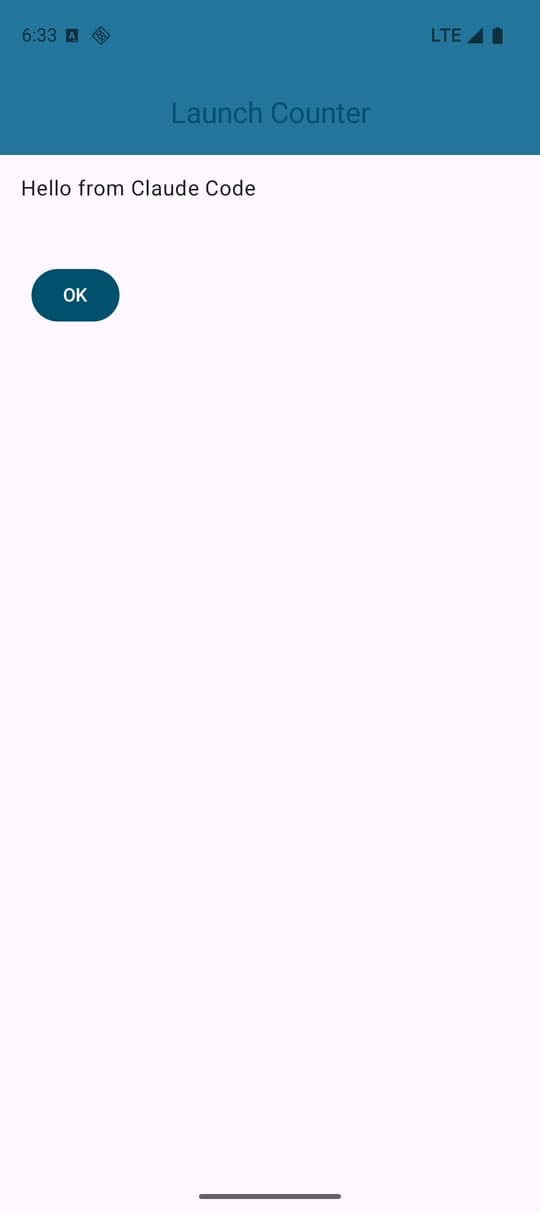
The useful part for an agent is that it can check its own work: android layout returns the screen as JSON, so the agent confirmed "Hello from Claude Code" was on screen without anyone looking at it.
Fix what breaks on a real machine
- Broke
- 4 things
- Fixed by the agent
- All 4
- Changed outside the project
- 1 AVD file
Run on a Mac for this guide
Four things failed on the first try. The agent got past each one, and you should know them:
android buildfrom the project root fails. It looked for:assembleDebugon the root project.:app,./appandapp/failed too. The full Gradle task works:android build :app:assembleDebug.- The emulator image was missing. The existing Pixel 9 emulator pointed at a system image that was not installed.
android sdk installfixed it in 43 seconds. - The emulator skin was missing. The emulator refused to start with "unknown skin name 'pixel_9'", headless or not. The agent edited two lines in the emulator's
config.inito run without a skin. That file is outside the project: it kept a copy, and I put the original back afterwards. Allow file edits only inside the project if you do not want that. - The boot wait timed out.
android emulator startbooted the emulator but its own wait failed with an adb "closed" error.adb wait-for-deviceconfirmed the boot, and everything after worked.
One more, from the template itself: the empty-activity template's own UI test expected text that did not match its greeting. The agent fixed the test while changing the greeting, but did not run it.
IDE or terminal?
- Use Claude Agent in Android Studio when you are in the IDE anyway: it gets Studio's project model, Gradle, Compose previews, Logcat and the emulator as tools, and Studio's Change Review can walk you through what it changed.
- Use Claude Code with the Android CLI plugin for headless work: CI, scripts, or an agent running on another machine. It needs no IDE, and the same commands work for you.
- Both run on your Claude account, a plan or an API key. The agent sends your code to its provider, under that provider's terms, whichever window you run it from. Android Studio's built-in agent stays available at no extra charge.
Building an Android app, or a tool for Android developers? Launch it on the weekly board: launching is free, every launch is reviewed by a person, and it gets a permanent listing page. Submit it here.
From the docs, not run here
From the docs, not run here
- Codex, Junie and Antigravity in the IDE. Google says each signs in with its own plan or an API key, and that Antigravity gives access to the latest Gemini models.
- Codex's install of the same plugin:
codex plugin marketplace add android/android-cli-pluginandcodex plugin add android-cli@android-cli-plugin. - Remote physical devices with
android device remote, Compose previews from the terminal withandroid preview, and memory-leak analysis withandroid profiler leakcanary, all announced at Android Dev Summit on October 28.
Sources
- Android Developers Blog, Your favorite agents are now integrated in Android Studio
- Android Developers Blog, What's new in Android developer tools and performance at Android Dev Summit, October 28, 2026
- Android Developers Blog, Build your way: Use any AI agent of your choice in Android Studio (the preview announcement)
- Android Developers, Android Studio Rabbit 2 release notes, Agent plugins and Android CLI downloads
- android/android-cli-plugin on GitHub, and the Agent Client Protocol introduction
Disclaimer: Nick Launches is not affiliated with Google or Anthropic. Tested on one Mac on November 9, 2026, with Android Studio Rabbit 2 (2026.2.2 Patch 1), Android CLI 1.1.16717390 and Claude Code 2.1.319. Agent features in Android Studio are labelled preview and change between releases.